NEW!

HL7 v2.x Message Validator

Validate HL7 v2.x messages instantly. Catches missing segments, bad MSH, code-table errors and datatype issues — all in your browser. PHI never uploaded.

HIPAA-Compliant by Design

Your medical data never leaves your device. No PHI is transmitted to any server.

HIPAA-Friendly No PHI Transmission Local Processing

Or drag & drop a .hl7 file here

All processing happens locally in your browser. Your HL7 messages and PHI never leave your device. HIPAA-compatible.

Keywords

HL7 validator, HL7 v2 validation, HL7 message validation, HL7 conformance check, HL7 schema check, HL7 lint, HL7 syntax checker, HL7 v2.x validator

Need something else?

How to use

1

[object Object]

2

[object Object]

3

[object Object]

4

[object Object]

5

[object Object]

Features

Structural and Content Validation

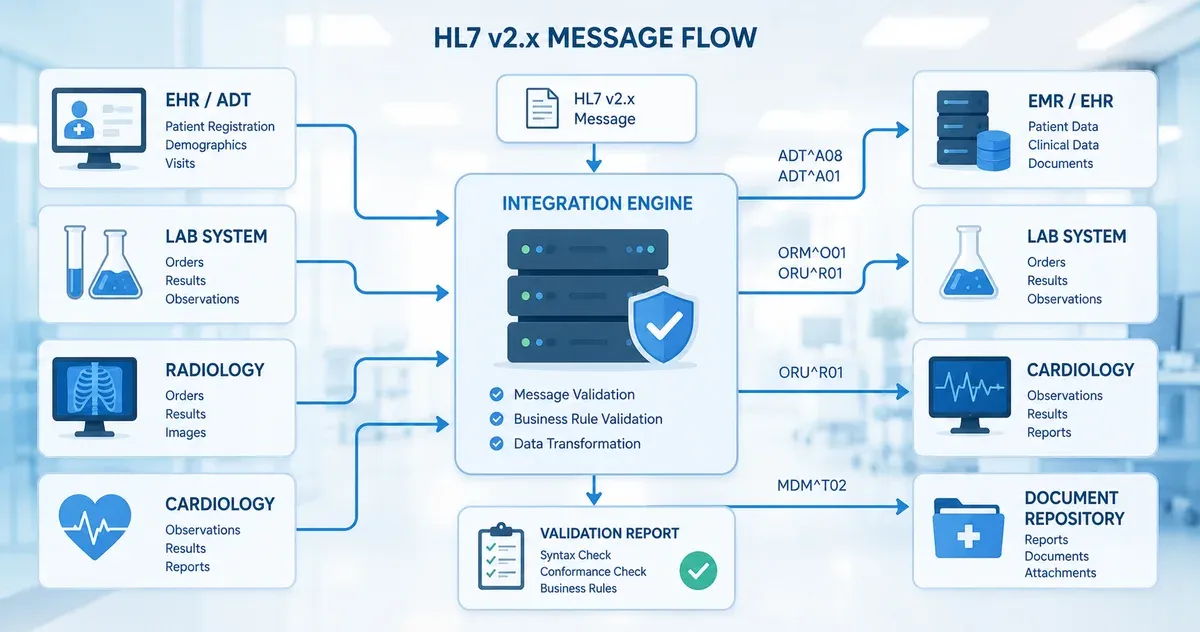
Validates encoding characters in MSH-1/MSH-2, MSH segment structure, presence of required segments per message type (ADT, ORM, ORU, SIU, MDM, ACK, QRY, RSP, RDE, VXU, DFT), required fields per segment, datatype shape (DTM, DA, TM, NM), and code-table values (PV1.2 patient class, PID.8 sex, MSA.1 ack code, ORC.1 order control, OBX.2 value type, MSH.11 processing ID).

Severity-Aware Issue Reporting

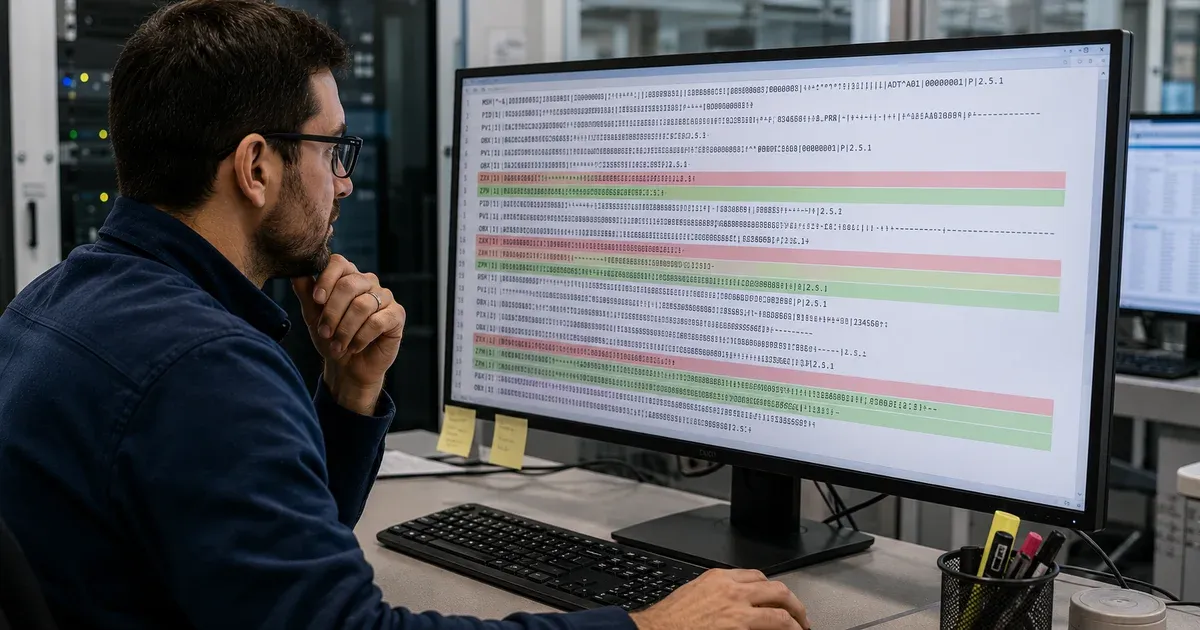
Distinguishes errors (must fix), warnings (likely a bug), and info (may be intentional). The summary counts and color-coded badges let you triage at a glance — fix errors first, address warnings before deploying, and use info to spot suspicious-looking but technically valid patterns.

Line-Level Location Reporting

Each issue points to the exact segment occurrence, field index, and 1-based line number in the pasted text. You can jump straight to the offending field in your editor or interface engine without manually counting pipes.

Real-World Tolerant Parser

Handles the common HL7 v2.x deviations seen in production traffic: \r\n line endings instead of \r, missing trailing fields, extra blank lines, mixed Latin-1 and UTF-8 content. The validator inspects what is actually there rather than rejecting at parse time.

Privacy-First Local Processing

All parsing and validation runs in your browser via WebAssembly-grade JavaScript. The HL7 message and any PHI it contains never leave your device. Safe for hospital, clinic, lab, and payer workstations.

Why Choose This Tool?

PHI Never Leaves Your Device

Cloud-based validators force you to send patient data to a third party — a hard sell to hospital security and a possible HIPAA exposure. This validator runs 100% in your browser and makes no network calls during validation. You can use it on an air-gapped workstation.

Built for Integration Engineers, Not Just Spec Geeks

Most HL7 validators flag every spec deviation as an error and bury you in noise. This one prioritizes the issues that actually break interfaces in production: missing PID.3, malformed MSH-7, inconsistent ack codes. Errors first, then warnings, then info.

Explains the Rule, Not Just the Failure

Every issue cites the specific HL7 rule it violates (e.g., 'MSH structure: encoding-chars-mismatch', 'PID.8 not in HL7 0001'). You can copy the rule ID into a ticket so the upstream team understands exactly what to fix.

Part of an Integrated HL7 Toolchain

Pair the validator with the HL7 Viewer to inspect the raw segments, the Segment Browser for field definitions, the ACK Generator to simulate downstream responses, and the HL7 to JSON converter to feed the validated message into modern pipelines. Complete HL7 troubleshooting without leaving the site.

How HL7 v2.x Validation Works: A Practical Guide for Interface Analysts

Why Validate Before You Send

Most HL7 v2.x interfaces in the wild are technically non-conformant in some way: a missing trailing field, a non-standard ack code, a date in YYYY-MM-DD instead of YYYYMMDD. Many of these survive in production for years because the receiving system happens to be tolerant. But the day you change vendor, switch interface engines, or migrate to a stricter platform like a HAPI-based validator, those latent bugs surface as failed message processing. Pre-flight validation lets you find and fix them on your schedule, not the integration go-live calendar.

The Three Layers of HL7 v2.x Validation

Layer 1: Encoding and structure. The first character after MSH establishes the field separator (almost always |). The next four characters establish the encoding characters: component (^), repetition (~), escape (\), and subcomponent (&). A validator must read these dynamically and reject messages that announce one set of encoding characters in MSH-2 but use different ones throughout the body.

Layer 2: Required segments and fields. Each message type (the value in MSH-9, e.g. ADT^A01) has a defined structure: which segments must appear, which are optional, and which can repeat. An ADT^A01 requires MSH, EVN, PID, and PV1; missing PV1 is an error. An ORU^R01 requires MSH, PID, OBR, and at least one OBX. The validator walks the message against the message-type structure and flags missing required segments.

Layer 3: Datatypes and code tables. Even when the structure is correct, individual fields may carry invalid values. PID.8 (administrative sex) must be one of M, F, O, U, A, N. PV1.2 (patient class) must be one of E, I, O, P, R, B, C, N, U. MSA.1 (acknowledgment code) must be one of AA, AE, AR, CA, CE, CR. Datetime fields like MSH-7 must conform to the HL7 DTM datatype (YYYYMMDDHHMMSS[.S[S[S[S]]]][+/-ZZZZ]). A validator that catches these surface-level violations prevents downstream parsers from rejecting the message.

Errors vs Warnings: How This Validator Triages

An error means the message will fail at most receivers — missing MSH, missing required segment, malformed encoding. A warning means the message is accepted by tolerant receivers but rejected by strict ones — non-standard code values, weakly typed dates, missing optional but commonly required fields. An info-level finding flags patterns that are spec-compliant but suspicious in real traffic — for example, a PID without PID.3 (patient identifier list), which is technically optional in some message types but almost always indicates an upstream MPI issue.

Why MSH-2 Mismatches Are So Common

MSH-2 declares the encoding characters used in the rest of the message. The default value is ^~\&. A common bug pattern is a sender that hard-codes the standard encoding string in MSH-2 but actually emits a different escape character in field bodies (e.g., uses % instead of \). Receivers that read MSH-2 dynamically (the correct behavior) then misinterpret escape sequences or leave them un-resolved. The validator detects this by checking that escape sequences appearing in field values use the character declared in MSH-2.

Required-Segment Rules by Message Type

This validator enforces required segments for the most common message types:

  • ADT (admission, discharge, transfer): MSH, EVN, PID, PV1
  • ORM / OMG / OMI / OML / OMP / OMS / OMD (orders): MSH, PID, ORC, OBR
  • ORU / ORF / ORG / ORI / ORL / ORN / ORP / ORR / ORS / ORU (results): MSH, PID, OBR, OBX
  • SIU (scheduling): MSH, SCH, PID, AIS or AIG or AIL or AIP
  • MDM (medical document management): MSH, EVN, PID, TXA
  • ACK (acknowledgment): MSH, MSA
  • QRY / RSP (queries and responses): MSH, QPD or QAK
  • RDE (pharmacy/treatment encoded order): MSH, PID, ORC, RXE
  • VXU (vaccination update): MSH, PID, RXA
  • DFT (detailed financial transaction): MSH, EVN, PID, FT1

Datatype Validation: DTM, DA, TM, NM

HL7 v2.x defines several primitive datatypes whose format you can validate without consulting a separate registry. DTM (date/time): YYYYMMDDHHMMSS with optional fractional seconds and timezone offset. DA (date): YYYYMMDD. TM (time): HHMMSS. NM (numeric): optional sign followed by digits and an optional decimal portion. The validator runs format checks against these datatypes whenever the schema dictates a typed value (e.g., MSH-7 is DTM, OBX-5 is variable but checked against the OBX-2 value-type code).

Code-Table Validation

The validator includes the most operationally important code tables: HL7 0001 (sex), HL7 0004 (patient class), HL7 0008 (acknowledgment code), HL7 0103 (processing ID), HL7 0119 (order control), and HL7 0125 (value type). When a field whose datatype is constrained to one of these tables carries a value that is not on the list, the validator flags a warning rather than an error — many systems intentionally extend these tables with site-specific values, so the cleanest action is to flag and let the analyst decide.

Practical Workflow: Validate, Fix, Re-Send

A typical use of the validator looks like this. An interface analyst receives a complaint that an ADT feed is being rejected by the downstream EHR. They paste the failing message into the validator and immediately see two errors: missing PV1 and a malformed MSH-7 (2024-03-15T09:30 instead of 20240315093000). They flag the upstream sending application, attach the validation report to the ticket, and the upstream team knows exactly what to fix. The cycle that used to require pulling logs from the interface engine, eyeballing pipe-delimited text, and arguing with a vendor support contact collapses to under a minute.

What This Validator Does Not Do

This validator does not perform full conformance against an external profile (e.g., a vendor's customized message specification or a country-specific implementation guide). It does not check business-logic rules like 'OBR-7 must be on or after OBR-25' or 'PV1.44 must be set when PV1.2 = I'. It does not validate Z-segments (custom segments outside the HL7 standard). For those checks, you need a profile-aware validator like NIST's MWB or a HAPI-based custom validator. The role of this tool is to catch the 80% of issues that are independent of profile and would block any downstream processor.

From Validation to Resolution

Once the validator surfaces an issue, the next step is fixing the upstream system that produces the message. For required-segment errors, work with the sending application to add the missing segment or, if the segment is genuinely optional in your version of the spec, document the deviation and configure the receiver to accept it. For datatype errors, fix the source formatter. For code-table warnings, either align the value to the standard table or extend the receiver's allowed values explicitly. The validator gives you the precise rule citation needed to drive that conversation.

Frequently Asked Questions

Does this validator send my HL7 message to a server?

No. All parsing and validation runs in your browser using JavaScript. No message content, PHI, or patient data is transmitted. You can confirm this in your browser's developer tools network tab.

What HL7 versions are supported?

HL7 v2.x (v2.1 through v2.9). The validator reads encoding characters from MSH-1 and MSH-2 dynamically, so it works on any v2.x version without requiring a version selector.

How does the validator distinguish errors from warnings?

Errors are violations that will be rejected by most receivers — missing MSH, missing required segment for the message type, malformed encoding characters, structurally invalid MSH. Warnings are issues that tolerant receivers accept but stricter ones reject — non-standard code values, weakly formed dates, missing optional-but-expected fields. Info items flag patterns that are spec-compliant but suspicious in real traffic.

Which message types are validated for required segments?

ADT, ORM family (OMG/OMI/OML/OMP/OMS/OMD), ORU family (ORF/ORG/ORI/ORL/ORN/ORP/ORR/ORS), SIU, MDM, ACK, QRY/RSP, RDE, VXU, and DFT. Other message types are parsed but only general structural rules are applied.

Which code tables does the validator check?

HL7 0001 (administrative sex), HL7 0004 (patient class), HL7 0008 (acknowledgment code), HL7 0103 (processing ID), HL7 0119 (order control), HL7 0125 (value type). Values outside these tables are flagged as warnings, not errors, since some systems intentionally extend them.

Can I validate Z-segments or custom profile rules?

No. Z-segments are parsed but not validated against any rules. Profile-specific conformance (e.g., a vendor implementation guide) requires a profile-aware validator like NIST MWB. This validator targets standard HL7 v2.x rules that are profile-independent.

Does it validate datatypes?

Yes — DTM (date/time), DA (date), TM (time), and NM (numeric) datatypes are format-checked. The validator runs the check whenever the schema indicates a typed field, e.g., MSH-7 (DTM), PID-7 (DTM), OBX-5 against the value type declared in OBX-2.

What does line-level location reporting mean?

Each issue cites the segment name, occurrence index (e.g., second OBX), 1-based field index, and the line number in the pasted text. You can jump straight to the offending field in your editor without manually counting pipes.

Is this tool HIPAA compliant?

The tool's privacy design (local processing, no data transmission) is consistent with HIPAA's technical safeguard requirements. Compliance also depends on your workstation security, browser configuration, and organizational policies — consult your compliance officer.

What if my message uses non-standard encoding characters?

The validator reads MSH-1 and MSH-2 to discover the actual encoding characters in use, so messages with non-default encodings are validated correctly. If MSH-2 declares one set of characters but field bodies use a different escape character, the validator flags the inconsistency.

How does this validator differ from the HL7 Viewer or Segment Browser tools on this site?

The Viewer renders the message as a structured tree for inspection. The Segment Browser is a lookup reference for segment and field definitions. The Validator runs automated rules and produces a pass/fail report. They are complementary — use them together when troubleshooting an interface.

Learn more