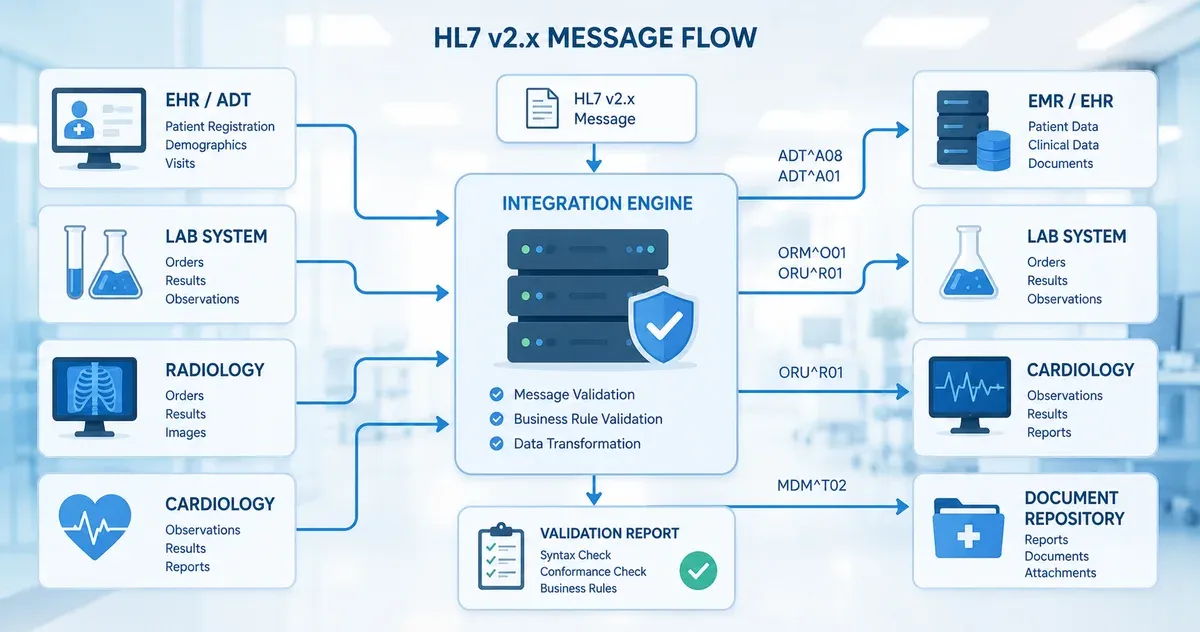
Why HL7 Message Validation Matters
Healthcare data interoperability depends on HL7 v2.x messages being structurally correct and semantically meaningful when they are consumed by receiving systems. An incorrectly delimited message, a missing required segment, or a field value in the wrong data type can silently fail — writing garbage into an EHR, triggering an ADT mismatch, or causing a lab order to be lost entirely. In a clinical environment, these failures are not just technical inconveniences; they can result in delayed care or medication errors.
The challenge is that HL7 v2.x is one of the most widely deployed healthcare messaging standards in the world, yet it is also one of the least strictly enforced at the transport layer. A sending system can transmit a malformed message that a receiving system silently ignores, logs, or partially accepts — with no error returned to the sender. Validation tooling bridges this gap: it gives integration developers a way to inspect a message's structure before it enters a production interface engine or EHR system.
This guide explains the core concepts of HL7 v2.x message structure, the most common validation errors encountered in real integration projects, and how to use a browser-based validator as part of your testing workflow. All message examples in this guide are synthetic — they do not contain any real patient data.
HL7 v2.x Message Anatomy
Segments, Fields, Components, and Subcomponents
An HL7 v2.x message is a flat text structure organised into segments. Each segment begins with a three-character identifier (e.g., MSH, PID, PV1, OBX) and contains a fixed set of fields separated by the field separator defined in MSH-1. Fields are further divided into components by the component separator, and components into subcomponents by the subcomponent separator.
The standard default delimiters defined in the MSH segment are:
- Field separator:
|(pipe) - Component separator:
^(caret) - Repetition separator:
~(tilde) - Escape character:
\(backslash) - Subcomponent separator:
&(ampersand)
These separators are declared in MSH-2 (encoding characters) immediately after the field separator in MSH-1. A validator reads this declaration and uses those specific characters when parsing the rest of the message. This means a message that uses non-standard delimiters (e.g., changing ^ to |) can be technically valid if it declares those delimiters correctly in MSH-2 — but it will break any downstream system that assumes the defaults.
The MSH Segment
The Message Header (MSH) segment is mandatory and must be the first segment of every HL7 v2.x message. It contains metadata about the message itself: the sending and receiving application and facility identifiers, the message type and event, the message control ID (a unique identifier used for acknowledgement), the timestamp, and the version identifier. A valid MSH segment looks like this:
MSH|^~\&|SendingApp|SendingFacility|ReceivingApp|ReceivingFacility|20240315093000||ADT^A01^ADT_A01|MSG00001|P|2.5
Key fields: MSH-3 (Sending Application), MSH-4 (Sending Facility), MSH-5 (Receiving Application), MSH-6 (Receiving Facility), MSH-7 (Date/Time of Message), MSH-9 (Message Type), MSH-10 (Message Control ID), MSH-11 (Processing ID — P for production, T for test), MSH-12 (Version ID).
Common Segment Types
- EVN (Event Type): Documents the trigger event that caused the message. Required in most ADT messages.
- PID (Patient Identification): Contains patient demographic data — name, date of birth, sex, address, identifiers. Present in ADT, ORM, ORU, and most other message types.
- PV1 (Patient Visit): Captures encounter-level data: visit number, patient class (inpatient/outpatient/emergency), attending physician, assigned location.
- ORC (Common Order): Contains order control information for lab and radiology orders. Required in ORM messages.
- OBR (Observation Request): Specifies what is being ordered or observed. Used in ORM and ORU messages.
- OBX (Observation/Result): Carries individual observation values — lab results, vital signs, clinical findings. Contains the value type (NM, ST, CWE, etc.) and the actual result.
- NTE (Notes and Comments): Carries free-text notes attached to other segments.
The Most Common HL7 Validation Errors
Missing MSH Segment or Incorrect Segment Order
Every message must begin with MSH as the very first segment. If the message begins with another segment, or if MSH appears after other segments, no downstream system will be able to parse it. This error frequently occurs when a source system incorrectly wraps or prefixes the message with a proprietary header before the standard HL7 content.
Delimiter Mismatch
The most common and insidious validation error. The delimiters declared in MSH-1 and MSH-2 must match the delimiters actually used in the rest of the message. If MSH-2 declares ^~\& but the message uses | as a component separator in PID-5, the parser will misinterpret every field in the message. This error often originates in data transformation pipelines where an interface engine or HL7 library substitutes characters without updating MSH-2.
Required Fields Missing or Empty
Each HL7 message type has required fields defined in the standard. For ADT^A01 (patient admission), required fields include MSH-9, MSH-10, MSH-12, PID-3 (Patient Identifier List), and PV1-2 (Patient Class). Sending these fields empty or omitting them entirely will cause receiving systems to reject the message or produce incomplete records.
Data Type Violations
HL7 defines strict data types for each field. Common violations include sending a free-text string in a Numeric (NM) field, placing a value in a Date/Time (DTM or TS) field in the wrong format (e.g., 03/15/2024 instead of 20240315), or sending a coded element (CWE or CE) without the required code system identifier component. These violations often pass through interface engines without error but cause downstream parsing failures.
Excessive Message Length and Truncated Fields
Many HL7 fields have defined maximum lengths in the standard. While most modern interface engines do not strictly enforce length limits, some legacy systems do. A patient name that exceeds the PID-5 component limits, or a free-text note in an NTE segment that exceeds the receiving system's buffer, can cause truncation or processing errors.
Z-Segment Issues
Z-segments are custom segments that implementations add for data that does not fit into the standard segment definitions. They follow the same structural rules as standard segments (three-character name starting with Z, pipe-delimited fields) but their field definitions are not standardised. Validation of Z-segments requires documentation from the sending system's interface specification. A Z-segment that appears in a message without corresponding documentation at the receiving end will typically be ignored, but it may also trigger parsing errors in strict interface engines.
A Practical Validation Workflow
Phase 1: Structural Validation
Before testing interface behaviour, validate the raw message structure: Does it begin with MSH? Are the delimiters correctly declared and consistently used? Are all required segments present and in the correct order for the declared message type? A browser-based tool like our HL7 message validator performs all of these checks instantly without requiring the message to be sent through an interface engine.
Phase 2: Field-Level Validation
After structural validation passes, validate field content: Are required fields populated? Are data types correct? Are coded values valid (e.g., does the patient class value in PV1-2 match a valid HL7 table value)? Are timestamps in the correct DTM format? This phase often requires comparing the message against the sending system's interface control document (ICD).
Phase 3: Business Logic Testing
Structural and field validation do not guarantee that the message will produce the correct outcome in a receiving system. Business logic testing verifies that: the message type and trigger event match the clinical workflow being tested; the patient identifier in PID-3 matches an existing patient record in the receiving system; the ordering provider in ORC-12 or OBR-16 has the correct NPI or system identifier; and the message control ID in MSH-10 is unique within the defined deduplication window.
Phase 4: Acknowledgement Testing
In a production HL7 v2.x exchange, the receiving system should return an ACK (acknowledgement) message with an AA (Application Accept), AE (Application Error), or AR (Application Reject) response in MSA-1. Testing that the receiving system sends the correct acknowledgement for both valid messages and deliberately malformed messages is an important part of interface testing that is distinct from message validation.
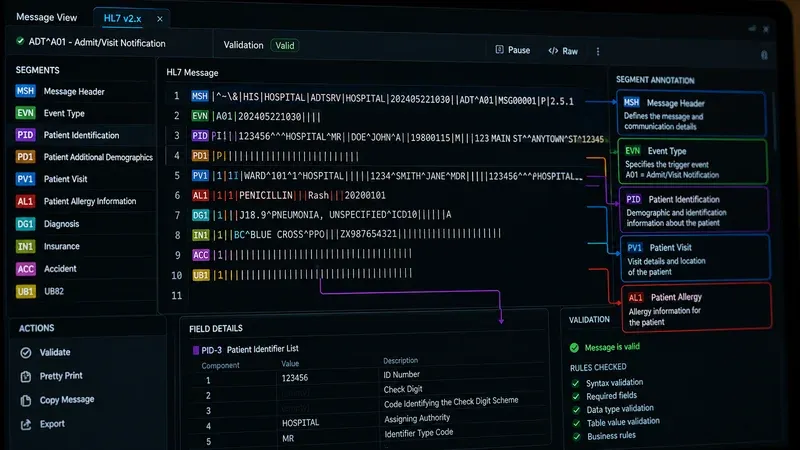
Before and After: Diagnosing a Malformed ADT^A01
The best way to understand validation errors in practice is to examine a concrete example. The following ADT^A01 message contains three distinct structural errors. Try to identify them before reading the diagnosis.
MSH|^~\|SendingApp|HospA|EHRSystem|HospA|20240318142500||ADT^A01|MSG1042|P|2.5
EVN|A01|20240318142500
PID|1||123456789^^^HospA^MR||Smith^John^A||19850422|M|||123 Main St^^Chicago^IL^60601||3125550190
PV1|1|I|3W^307^01^HospA^^^|||||||||||||ADM|V12345|||||||||||||||||||20240318142500
The three errors are:
- MSH-2 is missing the subcomponent separator. The correct encoding characters string is
^~\&(four characters: caret, tilde, backslash, ampersand). The message above uses only^~\— three characters — so the subcomponent separator&is absent (the escape character\is present). Any subcomponents in message data will not be parsed correctly, and some validators will reject the message outright for this reason. - EVN-1 is populated in a v2.5 message. EVN-1 (Event Type Code) was deprecated — retained for backward compatibility — in HL7 v2.5 and withdrawn in v2.7; it was not retired in v2.3.1, where it was still a normal field. While many legacy systems still send it, a strict v2.5 validator will flag this field as deprecated. The trigger event is already declared in MSH-9 (ADT^A01); the value in EVN-1 is redundant and can conflict if it does not match MSH-9.
- PV1-3 (Assigned Patient Location) is under-qualified. The standard requires that for inpatient admissions the location field carry at minimum a point-of-care, room, and bed. The entry
3W^307^01^HospA^^^leaves the last three components (building, floor, location type) empty. Many conformance profiles for ADT^A01 mark these components as required for inpatient class, causing profile-based validators to reject the message.
Running this message through our HL7 message validator will surface the MSH-2 and EVN-1 issues immediately. The PV1-3 issue requires profile-based validation (covered below). For a broader library of test messages across ADT event types, see our article on HL7 ADT test messages for interface testing.
MSH-12 Version Negotiation Pitfalls
MSH-12 (Version ID) declares which HL7 v2.x version the message conforms to. Common values are 2.3, 2.3.1, 2.4, 2.5, 2.5.1, 2.6, and 2.7. This field should accurately reflect the version used to define the message structure — but in practice it frequently does not, which causes subtle and hard-to-diagnose validation failures.
The most common pitfall is a mismatch between the declared version and the actual field usage. A system that declares MSH-12 = 2.3 but sends OBX segments with CWE (Coded with Exceptions) data types — introduced in v2.5 — will fail validation against strict version-aware validators, because CWE did not exist in 2.3. The fix is to update MSH-12 to the version that actually matches the field definitions in use, or to use the older CE (Coded Element) data type for compatibility with the declared version.
A second problem occurs when trading partners run different HL7 versions. If System A sends v2.5.1 messages to System B, which only supports v2.3.1, the receiver may silently discard fields added in 2.4 and later. The safest approach in heterogeneous environments is to agree on the lowest common version in the trading partner agreement and limit the message content to fields that exist in that version, even if both systems technically support something higher.
Conformance Profile Validation
The HL7 v2.x base standard is deliberately permissive: most fields are optional, and the standard allows extensive local customisation. This flexibility drives adoption but undermines interoperability. A message that is technically valid against the base standard may be functionally invalid for a specific trading partner that requires additional mandatory fields, restricted table values, or a different segment sequence.
A conformance profile (also called a site-specific implementation guide) constrains the base standard for a particular use case and trading relationship. Profiles are the mechanism by which two systems agree on a deterministic, testable message format beyond what the base standard requires. Common profiles include IHE PAM (Patient Administration Management), specific EHR vendor implementation guides, and custom profiles negotiated between hospital systems and their integration partners.
Profile-based validation requires the profile document to be loaded into the validation tool. Our browser-based validator checks against the HL7 base standard; for full profile compliance testing you need a tool that accepts a conformance profile definition alongside the message. For a step-by-step guide to writing and applying site-specific profiles, see our article on HL7 conformance profiles and site-specific validation.
Z-segment validation is closely related. If your trading partner uses custom Z-segments, their field definitions are not in the base standard and must be provided as part of the conformance profile. See our article on validating HL7 v2 with custom Z-segments for a practical walkthrough.
HL7 v2.x vs. FHIR Validation: Key Differences
As organisations migrate toward FHIR-based integrations, integration analysts increasingly work with both HL7 v2.x and FHIR R4 messages. Understanding the fundamental validation differences is essential for managing hybrid integration environments.
Schema mechanism: HL7 v2.x has no formal machine-readable schema in the same sense as XML Schema or JSON Schema. Validation is done by parsing the message against the prose specification or a conformance profile tool. FHIR resources are defined by formal JSON and XML structures with published StructureDefinition resources, and dedicated FHIR validators (such as the HL7 FHIR Validator CLI) can enforce constraints mechanically against those definitions.
Cardinality and constraints: In HL7 v2.x, cardinality (whether a field is optional or required, and how many repetitions are allowed) is defined in prose and enforced only by conformance profiles or custom tooling. In FHIR, cardinality is declared with explicit min/max values in StructureDefinition resources, and validators enforce these constraints automatically.
Terminology binding: HL7 v2.x uses internal table references (e.g., HL7 Table 0001 for Administrative Sex) whose allowed values are listed in the specification but not formally machine-checked by default. FHIR uses formal ValueSet bindings with explicit strength levels (required, extensible, preferred, example), and validators can automatically check terminology bindings against published ValueSets. For teams managing an active v2-to-FHIR migration, see our guide on migrating from HL7 v2.x to FHIR.
Validation Failures and ACK Responses
In production HL7 exchanges, the receiver communicates validation outcome back to the sender through an ACK message. The MSA-1 field carries one of three codes: AA (Application Accept — message was valid and processed), AE (Application Error — message was received but contained an error that prevented full processing), or AR (Application Reject — message was rejected at the structural level and was not processed at all).
Common scenarios that generate an AE include: a required field is empty or malformed; the patient identifier in PID-3 does not match any record in the receiving system; or an order code in OBR-4 is not found in the receiving system's procedure dictionary. Common scenarios that generate an AR include: the MSH segment is malformed and the message cannot be parsed; the receiving application identifier in MSH-5 does not match the configured application name; or the message type in MSH-9 is not supported by the receiving application.
Understanding the expected ACK codes for your specific integration is essential for designing complete test cases. A structural validator can confirm that a message is well-formed before it reaches the interface, but ACK testing with a real or simulated receiver is the only way to verify end-to-end business logic. For a full breakdown of ACK structure, error code semantics, and enhanced acknowledgement mode, see our article on HL7 ACK messages explained. For diagnosing live interface failures that generate unexpected AE or AR responses, see our guide on troubleshooting HL7 interface issues.
Using a Browser-Based Validator in Your Workflow
Browser-based HL7 validators offer a significant advantage over interface engine testing environments: they are immediate, require no configuration, and — when implemented correctly — process the message entirely within the browser without transmitting message content to any server. This matters when testing messages that contain synthetic-but-realistic patient data, because it eliminates any possibility of that data being logged or retained by a third-party service.
Our HL7 message validator parses the message in your browser, identifies the message type and version from MSH-9 and MSH-12, validates delimiter consistency, checks segment presence and order, and reports field-level issues for standard segments. It is a first-line tool for rapid structural checks — not a substitute for full conformance testing against a site-specific profile, but a valuable complement to both interface engine testing and manual code review.
For a broader reference on the segment definitions and field positions you will encounter during validation, consult our HL7 segment and field reference guide.
Staying Current with HL7 Standards
HL7 v2.x standards continue to evolve through maintenance releases from HL7 International. While the core message structure remains stable, new event codes, segment definitions, and table values are periodically added. Integration analysts should review the official HL7 v2 specification alongside their trading partner agreements at least annually to confirm their validation rules match current expectations.
This article is for educational purposes and describes general HL7 v2.x message structures. It does not constitute clinical, legal, or regulatory compliance guidance. All message examples contain synthetic data. For specific implementation guidance or compliance questions, consult your interface engine documentation and qualified healthcare IT professionals.