What Is HL7 v2.x?
HL7 version 2.x (often called HL7 v2 or HL7 2.x) is the dominant standard for electronic data interchange between healthcare information systems. Despite being more than 30 years old, it continues to carry the majority of clinical message traffic in hospitals worldwide — patient admissions, laboratory orders and results, scheduling events, financial transactions, and clinical documentation. Most hospital interface engines (Mirth Connect, Rhapsody, Ensemble, Cloverleaf) are still primarily routing HL7 v2.x messages.
The Anatomy of an HL7 v2.x Message
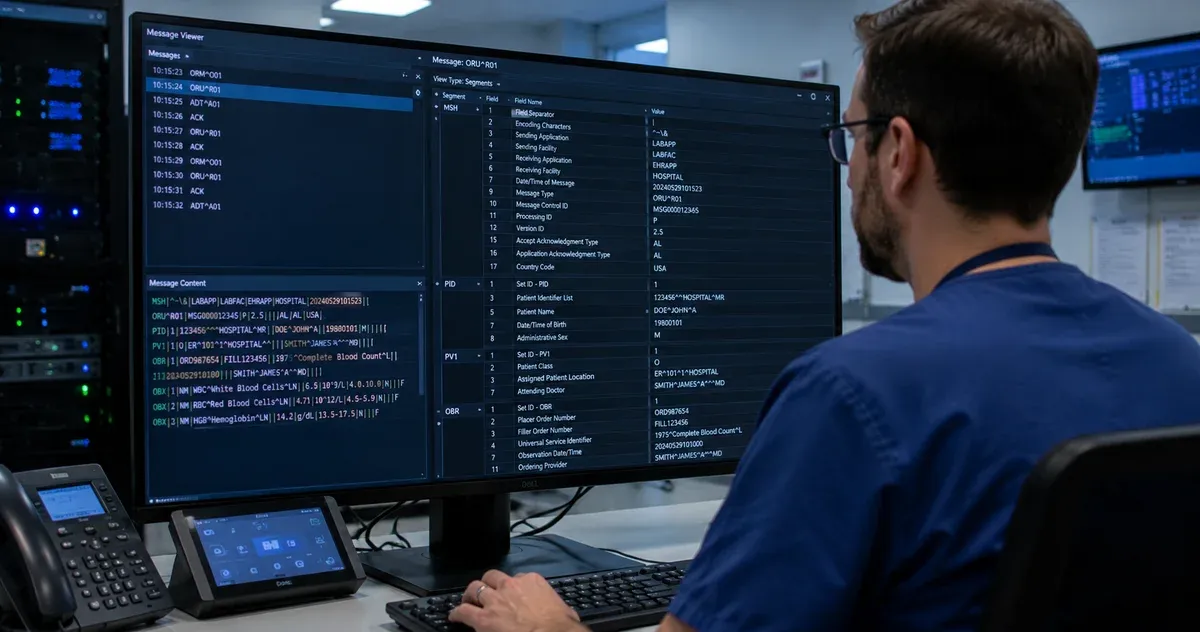
An HL7 v2.x message is a pipe-delimited text file where each line is a segment. Every segment starts with a three-letter code (e.g., MSH, PID, OBX), followed by fields separated by the pipe character |. Fields are numbered by position — MSH.9 is the 9th field and contains the message type. Fields can contain sub-components separated by carets (^) and repetitions separated by tildes (~).
A complete HL7 v2.x message is a sequence of these segments, where each segment carries a specific category of clinical or administrative information. The MSH (Message Header) always comes first and establishes the message type, version, and routing information. Patient demographics live in PID. Visit information is in PV1. Observation results appear in OBX.
The Most Important Segments
While the HL7 v2.x specification defines hundreds of segment types, a handful appear in nearly every integration scenario:
- MSH — Always the first segment. Contains message type (MSH.9), control ID for deduplication (MSH.10), sending and receiving application/facility, and HL7 version.
- PID — The core patient identifier segment. PID.3 contains the patient identifier list (MRN, national ID), PID.5 the patient name, and PID.7 the date of birth.
- PV1 — Patient visit details: patient class (inpatient/outpatient), assigned location, attending doctor, and admission type. Critical for ADT workflows.
- OBR — The order request segment in ORM and ORU messages. OBR.4 contains the universal service identifier (test code) and is the key field for mapping lab orders to your test catalog.
- OBX — Individual observation or result in an ORU message. OBX.2 declares the value type (NM for numeric, ST for string, CWE for coded), OBX.3 the observation identifier, and OBX.5 the actual value.
- EVN — Event type metadata for ADT messages. Contains the event type code (EVN.1) that distinguishes A01 (admit), A03 (discharge), A08 (update), and other patient movement events.
HL7 Data Types
Like DICOM's Value Representations, HL7 defines data types that govern how field values are encoded. Key data types include:
- ST (String) — Plain text up to a defined max length. Used for free-text fields like notes and descriptions.
- TS (Timestamp) — Date/time string in YYYYMMDDHHMMSS format. HL7 allows partial precision (YYYYMMDD for dates only).
- CX (Extended Composite ID) — A structured identifier with assigning authority and identifier type code. Used for MRNs, account numbers, and national patient IDs.
- XPN (Extended Person Name) — Structured name with family name, given name, middle initial, suffix, prefix, and name type code separated by carets.
- CE/CWE (Coded Element / Coded with Exceptions) — A coded value with identifier, description, and coding system (ICD-10, LOINC, SNOMED). The standard way to transmit coded clinical data.
- NM (Numeric) — Decimal number as a string. Used for test results, quantities, and measurements.
- HD (Hierarchic Designator) — An application or facility identifier. Used in MSH.3/4/5/6 for message routing.
Message Type Structure
HL7 v2.x defines message types as combinations of a message code and event code, written as Code^Event. For example: ADT^A01 (Admit), ORM^O01 (Order), ORU^R01 (Result), SIU^S12 (New Appointment), and MDM^T02 (Document). Each message type has a defined segment grammar specifying which segments are required, which are optional, and in what order they appear. The Message Types tab in this browser shows these grammars for the 10 most common message types.
Practical Use Cases for This Browser
Interface analysts and integration engineers use this segment browser in several everyday scenarios:
- Writing interface specifications: Reference field positions and data types when documenting mapping logic from source system fields to destination system fields.
- Debugging missing or misplaced data: When a receiving system reports a missing value, look up the segment to confirm the expected field position and data type.
- Understanding a new message type: Browse the ADT^A31 or DFT^P03 schema to understand what segments to expect when building a new interface.
- Training new analysts: The combination of segment definitions and message schemas makes a self-contained HL7 v2.x primer for team onboarding.
Three Reference Workflows
An analyst mapping a new lab feed hits an unfamiliar OBX-2 value like "CE" in a sample message and looks it up here rather than guessing — confirming it means Coded Element before writing a mapping rule that assumes the wrong shape for OBX-5.
A new team member onboarding onto an ADT interface opens the Message Types tab, clicks ADT^A08, and sees the full required-versus-optional segment sequence at a glance — turning what would otherwise be a slow read of a vendor's interface specification into a five-minute orientation.
An integration engineer troubleshooting an unexpected annotation in the HL7 Viewer jumps here to look up the exact field definition the viewer used — since both tools share the same underlying segment definitions, confirming the definition here confirms exactly what the viewer is doing with a real message, no guesswork required.
When Not to Use This Tool
This is a pure standard reference — it does not parse, validate, or process any HL7 message you might have, and there is no file upload at all. For inspecting an actual message, use the HL7 Viewer instead. It also covers 21 common segments across the 10 most frequent message types, not the hundreds of segment types the full HL7 v2.x specification defines, and it does not include vendor-specific Z-segments, which are proprietary extensions defined by individual organizations and outside any public standard. If your interface uses a segment or message type outside this set, the vendor's own interface specification remains the authoritative source.
Two Message-Type Schemas Compared
Seeing two schemas side by side shows how segment composition varies by message purpose — an admission event needs different segments than a lab result:
| Message type | Required segments (in order) | Common optional segments |
|---|
| ADT^A01 (Admit) | MSH, EVN, PID, PV1 | NK1, AL1, DG1 |
| ORU^R01 (Result) | MSH, PID, OBR, OBX | NTE, ORC |
The full grammar for all 10 covered message types, with exact ordering and repetition rules, is in the Message Types tab.
Working Alongside Other HL7 Tools
This browser is the reference layer underneath two other tools on this site: the HL7 Viewer, which annotates a real pasted message using these same segment definitions, and HL7 to JSON, whose HAPI-style mode names components after these same data types. Looking up an unfamiliar field here before parsing or converting a real message means you already know what to expect from the other tools' output.