Why You Need an HL7 Segment Field Reference
Healthcare integration engineers spend a significant portion of their day working directly with HL7 v2.x message segments. Whether you are building a new interface from scratch, troubleshooting a production data feed, or validating messages during a system migration, having quick access to field positions, data types, and optionality rules is essential. The HL7 v2.x standard defines hundreds of segments with thousands of individual fields — memorizing them all is impractical, even for experienced professionals.
This guide provides a working reference for the most commonly used HL7 v2.x segments and their fields. It covers the field positions, expected data types, and practical usage notes that you need for day-to-day integration work. For interactive exploration, use our free HL7 Segment Browser to search, filter, and browse all standard segments and their fields directly in your browser.
Understanding HL7 Field Positions and Data Types
Every field in an HL7 segment is identified by its position number — a sequential integer starting from 1. For example, PID-3 always refers to the Patient Identifier List, regardless of which HL7 version you are working with. This positional addressing system is one of the reasons the v2.x format has endured for decades: field positions are stable across versions, which simplifies cross-version compatibility.
Each field has an associated data type that defines its internal structure. Some of the most common data types include:
- ST (String Data) — Plain text, up to a defined maximum length. No internal structure.
- CWE (Coded with Exceptions) — A coded value drawn from a code system, optionally with a display name and coding system identifier. Replaces the older CE data type in HL7 v2.5+.
- CX (Extended Composite ID with Check Digit) — A composite identifier with components for the ID itself, assigning authority, identifier type code, and assigning facility.
- XPN (Extended Person Name) — A structured name with components for family name, given name, middle name, suffix, prefix, and degree.
- XAD (Extended Address) — A structured address with street, city, state, postal code, country, and address type components.
- XTN (Extended Telecommunication Number) — A structured phone number with components for country code, area code, phone number, extension, and telecommunication use code.
- TS / DTM (Time Stamp / Date/Time) — A timestamp in the format YYYYMMDDHHMMSS with optional fractional seconds and timezone offset.
- NM (Numeric) — A numeric value, optionally with a decimal point.
- ID (Coded Value for HL7 Tables) — A coded value drawn from a specific HL7-defined table.
- IS (Coded Value for User-Defined Tables) — A coded value drawn from a site-specific or user-defined table.
Composite data types like CWE, CX, XPN, and XAD contain multiple components separated by the component separator (caret ^ by default). Understanding these data types is crucial for correctly parsing and constructing HL7 fields.
MSH — Message Header Segment
The MSH segment is the foundation of every HL7 v2.x message. It defines the encoding characters, identifies the sender and receiver, specifies the message type and version, and carries the unique message control ID used for acknowledgment tracking.
Key fields include:
- MSH-1 (ST) — Field Separator. Usually the pipe character in modern interfaces, but it can be another agreed delimiter. This field is unique because the separator itself is the field value.
- MSH-2 (ST) — Encoding Characters. Defines the component (
^), repetition (~), escape (\), and subcomponent (&) separators. - MSH-3 (HD) — Sending Application. Identifies the system that originated the message.
- MSH-4 (HD) — Sending Facility. Identifies the organization or site that sent the message.
- MSH-5 (HD) — Receiving Application. Identifies the target system.
- MSH-6 (HD) — Receiving Facility. Identifies the target organization or site.
- MSH-7 (TS) — Date/Time of Message. When the message was created.
- MSH-9 (MSG) — Message Type. Contains the message type, trigger event, and message structure (e.g., ADT^A01^ADT_A01).
- MSH-10 (ST) — Message Control ID. A unique identifier used by the sender to match acknowledgment messages.
- MSH-11 (PT) — Processing ID. Indicates whether the message is production (P), training (T), or debugging (D).
- MSH-12 (VID) — Version ID. The HL7 version (e.g., 2.3, 2.5, 2.5.1).
- MSH-15 (ID) — Accept Acknowledgment Type. Controls whether the receiver sends an accept-level acknowledgment.
- MSH-16 (ID) — Application Acknowledgment Type. Controls whether the receiver sends an application-level acknowledgment.
- MSH-17 (ID) — Country Code. ISO 3166 country code for the sending facility.
- MSH-18 (ID) — Character Set. The character encoding used in the message body (e.g., UNICODE UTF-8, ASCII, 8859/1).
PID — Patient Identification Segment
The PID segment is the most information-dense segment in most clinical messages. It carries the patient's demographic data — identifiers, name, date of birth, address, phone numbers, and administrative classifications. A production PID segment routinely populates 15-20 fields out of the 39 defined positions.
Critical fields for integration work:
- PID-2 (CX) — Patient ID (External). An older field retained for backward compatibility. Most modern implementations use PID-3 exclusively.
- PID-3 (CX, repeating) — Patient Identifier List. The primary identifier field, often containing multiple IDs: MRN, national health ID, insurance number. Components include the ID itself, assigning authority, and identifier type code (MR, SS, DL, etc.).
- PID-5 (XPN, repeating) — Patient Name. Structured as family^given^middle^suffix^prefix^degree. Supports multiple names (legal, alias, maiden).
- PID-7 (TS) — Date/Time of Birth. Critical for patient matching algorithms.
- PID-8 (IS) — Administrative Sex. Coded value: M (Male), F (Female), O (Other), U (Unknown), A (Ambiguous).
- PID-10 (CWE, repeating) — Race. Coded per HL7 Table 0005.
- PID-11 (XAD, repeating) — Patient Address. Structured address with street, city, state, zip, country.
- PID-13 (XTN, repeating) — Phone Number — Home.
- PID-14 (XTN, repeating) — Phone Number — Business.
- PID-18 (CX) — Patient Account Number. Links the patient to a billing account.
- PID-19 (ST) — SSN Number. Deprecated in favor of PID-3 with identifier type SS.
- PID-22 (CWE, repeating) — Ethnic Group. Coded per HL7 Table 0189.
- PID-29 (TS) — Patient Death Date and Time.
- PID-30 (ID) — Patient Death Indicator. Set to Y when the patient is deceased.
OBX — Observation/Result Segment
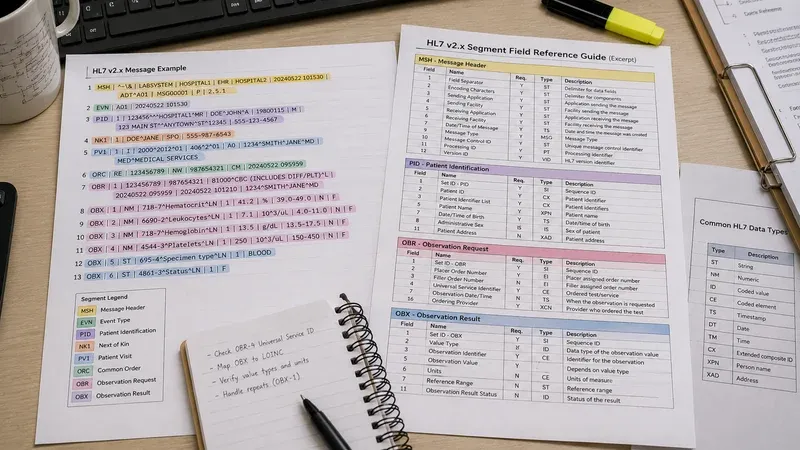
The OBX segment carries a single discrete result value — one analyte from a lab panel, one vital sign measurement, or one finding from a diagnostic report. A typical lab result message contains multiple OBX segments grouped under an OBR segment. Understanding OBX structure is essential for anyone working with laboratory, radiology, or clinical observation data.
- OBX-1 (SI) — Set ID. Sequential number within the message, starting from 1.
- OBX-2 (ID) — Value Type. Declares the data type of OBX-5. Common values: NM (numeric), ST (string), CWE (coded), TX (text), FT (formatted text), ED (encapsulated data).
- OBX-3 (CWE) — Observation Identifier. A LOINC code or local code identifying what was measured.
- OBX-4 (ST) — Observation Sub-ID. Distinguishes multiple OBX segments with the same OBX-3 code.
- OBX-5 (varies) — Observation Value. The actual result. Data type matches OBX-2.
- OBX-6 (CWE) — Units. UCUM or local units of measure.
- OBX-7 (ST) — References Range. The normal range for the result (e.g., "70-100", "3.5-5.0").
- OBX-8 (IS, repeating) — Abnormal Flags. H (High), L (Low), A (Abnormal), N (Normal), HH (Critical High), LL (Critical Low).
- OBX-11 (ID) — Observation Result Status. F (Final), P (Preliminary), C (Correction), X (Cancelled), I (In Progress).
- OBX-14 (TS) — Date/Time of the Observation.
- OBX-15 (CWE) — Producer's ID. Identifies the performing laboratory or department.
- OBX-16 (XCN, repeating) — Responsible Observer. The person who performed or verified the observation.
- OBX-23 (XON) — Performing Organization Name.
- OBX-24 (XAD) — Performing Organization Address.
- OBX-25 (XCN) — Performing Organization Medical Director.
PV1 — Patient Visit Segment
The PV1 segment describes the patient's current or most recent encounter. In ADT messages, PV1 is one of the most heavily populated segments, carrying location, provider, and admission details for the visit.
- PV1-2 (IS) — Patient Class. I (Inpatient), O (Outpatient), E (Emergency), P (Preadmit), R (Recurring), B (Obstetrics).
- PV1-3 (PL) — Assigned Patient Location. Structured as point of care^room^bed^facility^location status. Critical for census and bed management.
- PV1-4 (IS) — Admission Type. E (Emergency), U (Urgent), R (Routine), L (Elective).
- PV1-7 (XCN, repeating) — Attending Doctor. The physician of record for the encounter.
- PV1-8 (XCN, repeating) — Referring Doctor.
- PV1-9 (XCN, repeating) — Consulting Doctor.
- PV1-10 (IS) — Hospital Service. The clinical service (Medicine, Surgery, Cardiology, etc.).
- PV1-17 (XCN, repeating) — Admitting Doctor.
- PV1-19 (CX) — Visit Number. A unique identifier for this specific encounter.
- PV1-36 (IS) — Discharge Disposition. Coded destination at discharge (home, SNF, AMA, expired).
- PV1-44 (TS) — Admit Date/Time.
- PV1-45 (TS) — Discharge Date/Time.
OBR — Observation Request Segment
The OBR segment defines a diagnostic test or procedure order. It serves as the parent grouper for one or more OBX result segments. In a lab panel with 15 analytes, there is typically one OBR segment followed by 15 OBX segments.
- OBR-1 (SI) — Set ID. Sequential number within the message.
- OBR-2 (EI) — Placer Order Number. Assigned by the ordering system.
- OBR-3 (EI) — Filler Order Number. Assigned by the performing system.
- OBR-4 (CWE) — Universal Service Identifier. The code and name for the ordered test.
- OBR-7 (TS) — Observation Date/Time. When the specimen was collected or the procedure was performed.
- OBR-8 (TS) — Observation End Date/Time.
- OBR-13 (ST) — Relevant Clinical Information. Free-text clinical context for the order.
- OBR-16 (XCN, repeating) — Ordering Provider.
- OBR-22 (TS) — Results Rpt/Status Change Date/Time. Timestamp of the most recent status update.
- OBR-24 (ID) — Diagnostic Service Section ID. LAB, RAD, PATH, etc.
- OBR-25 (ID) — Result Status. F (Final), P (Preliminary), C (Corrected), X (Cancelled).
- OBR-31 (CWE, repeating) — Reason for Study. Clinical indication or diagnosis code.
- OBR-32 (NDL) — Principal Result Interpreter. The physician who interpreted the results.
Other Essential Segments
NK1 — Next of Kin / Associated Parties
NK1 carries emergency contact and next-of-kin information. Key fields include NK1-2 (Name), NK1-3 (Relationship), NK1-4 (Address), NK1-5 (Phone), and NK1-7 (Contact Role). Modern implementations also use NK1 to transmit employer information and insurance subscriber details. The segment supports up to 40 field positions in HL7 v2.5.
IN1 — Insurance Segment
IN1 carries insurance plan information for the patient. With 49 field positions in HL7 v2.5, it is one of the most complex segments in the standard. Key fields include IN1-2 (Insurance Plan ID), IN1-3 (Insurance Company ID), IN1-4 (Insurance Company Name), IN1-12 (Plan Effective Date), IN1-13 (Plan Expiration Date), IN1-16 (Insured Name), IN1-36 (Policy Number), and IN1-49 (Insured's ID Number). Financial and billing integrations depend heavily on accurate IN1 data.
ORC — Common Order Segment
ORC provides order-level control information that applies to all associated OBR segments. ORC-1 (Order Control) is the action code (NW for new order, CA for cancel, SC for status change). ORC-2 and ORC-3 mirror OBR-2 and OBR-3 (Placer and Filler Order Numbers). ORC-5 (Order Status) tracks the lifecycle: SC (Scheduled), IP (In Process), CM (Completed), CA (Cancelled).
DG1 — Diagnosis Segment
DG1 carries diagnostic information, typically ICD-10 codes. DG1-3 (Diagnosis Code) contains the coded diagnosis, DG1-4 provides the description, DG1-5 holds the diagnosis date/time, and DG1-6 indicates the diagnosis type (A for Admitting, W for Working, F for Final).
Practical Tips for Working with HL7 Segments
Using an Interactive Segment Browser
Keeping a printed reference sheet for all HL7 segments is impractical given the scale of the standard. Instead, use an interactive tool like our HL7 Segment Browser to look up any segment and field position instantly. You can search by segment code, filter by data type, and review field descriptions — all without leaving your browser. It supports the complete HL7 v2.5 specification with 527 field definitions across 21 commonly used segments.
Cross-Referencing Segments in Real Messages
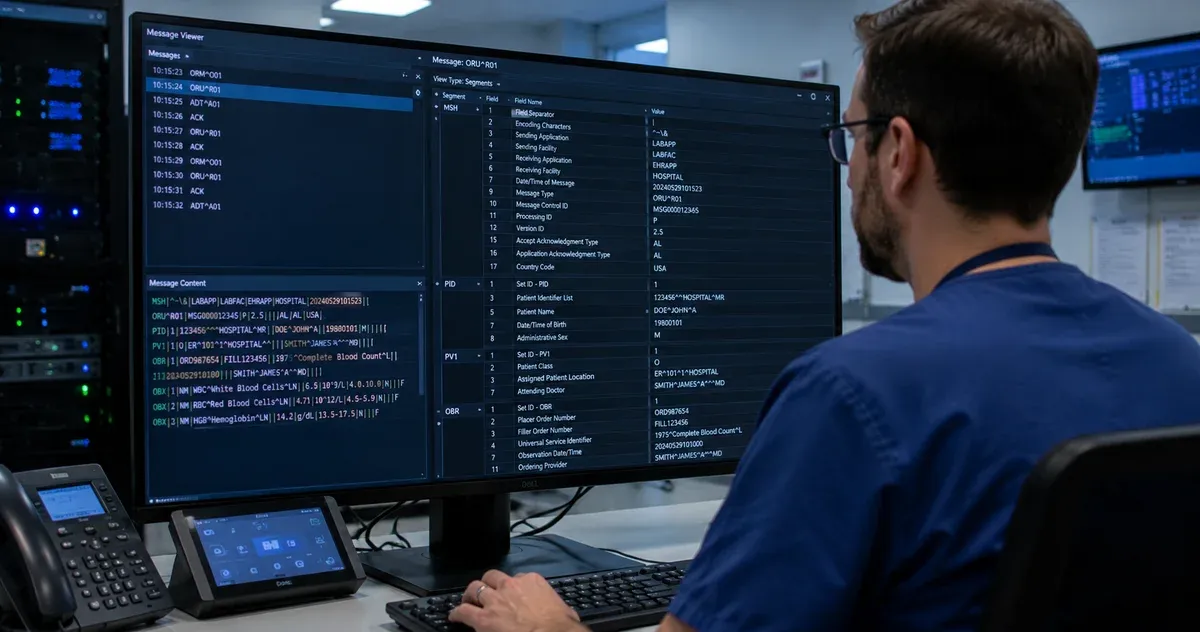
When debugging a production message, combine the segment browser with a message viewer. First, identify the problematic segment and field position in the message. Then look up that position in the segment browser to understand the expected data type, optionality, and typical values. This two-step approach — "what is this field?" followed by "what should it contain?" — resolves the majority of integration errors efficiently.
Version Differences
While most field positions remain stable across HL7 v2.x versions, some segments gained fields in later versions. PID expanded from 30 fields in v2.3 to 39 in v2.5. OBX added fields 23-25 (Performing Organization) in v2.5. Always check which version the sending system declares in MSH-12 and verify that both sides agree on the expected segment structure. Our segment browser covers the HL7 v2.5 specification, which is the most widely deployed version globally.
Conclusion
A solid working knowledge of HL7 segment field positions and data types is the foundation of effective healthcare integration work. While the full specification is vast, the segments covered in this guide — MSH, PID, PV1, OBR, OBX, NK1, IN1, ORC, and DG1 — account for the overwhelming majority of fields you will encounter in production HL7 interfaces. Bookmark our HL7 Segment Browser for quick lookups during your daily integration work, and pair it with the HL7 Message Viewer for end-to-end message analysis.
Disclaimer: This article is provided for informational and educational purposes only. It does not replace official HL7 International specifications or institutional policies for healthcare data integration.