
Introduction: The Hidden Half of DICOM Metadata
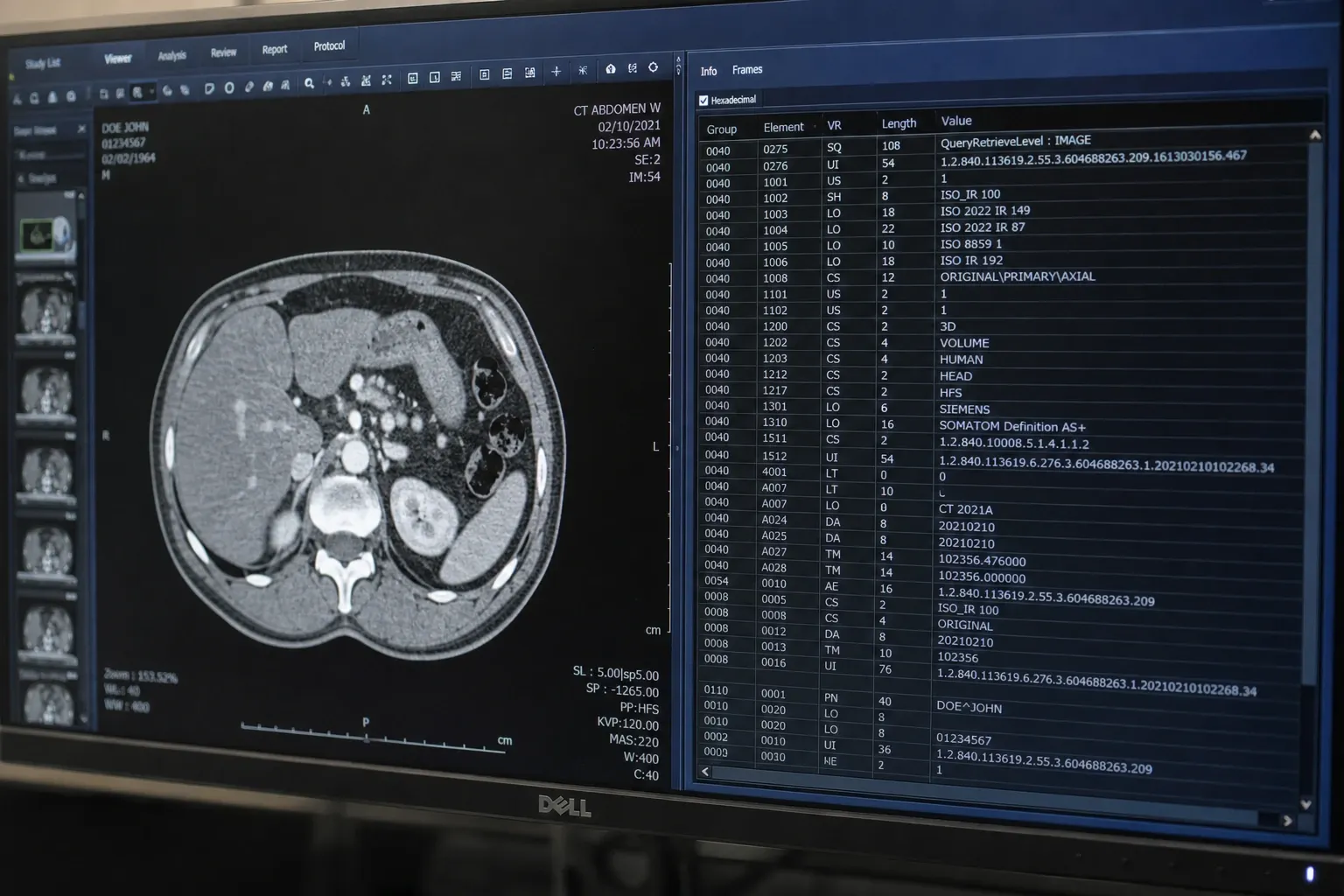
Every DICOM file you encounter in a radiology environment carries two parallel sets of metadata. The first is the standard public dictionary — tags like Patient Name (0010,0010), Study Instance UID (0020,000D), or Pixel Spacing (0028,0030). These are defined by the DICOM standard and behave consistently across vendors. The second set is the world of private tags: vendor-specific elements that do not appear in the public DICOM Data Dictionary and are added by manufacturers to encode proprietary information that the standard does not cover.
Private tags are everywhere. Almost every CT, MRI, ultrasound, or fluoroscopy image emerging from a modern modality includes them. They store reconstruction parameters, vendor-specific protocol identifiers, AI inference results, and sometimes — problematically — patient identifiers and operator names that the standard places elsewhere. Because private tags are by definition outside the standard, they are also the most common source of de-identification failures and migration headaches.
This article explains what private tags are, how to read them safely, why the private creator mechanism exists, and how to handle them when scrubbing PHI or transferring studies between archives. You can follow along by inspecting any DICOM file with our DICOM Tag Viewer or browsing the data dictionary in the DICOM Tag Browser. For the foundational mental model, start with our reference on DICOM tag structure for radiology IT.
What Makes a DICOM Tag “Private”?
A DICOM tag is identified by a pair of 16-bit hexadecimal numbers (GGGG,EEEE): the group number and the element number. The standard defines a simple rule: tags whose group number is odd are private. So (0019,1010), (0029,0010), and (7053,1003) are all private. Public tags use even groups: (0008,xxxx), (0010,xxxx), (0028,xxxx).
Within an odd group, the elements 0010 through 00FF are reserved for private creator identifiers. These are short text strings that name the “owner” of a block of private elements. Once a creator has reserved a block, the actual private data sits in elements between xx00 and xxFF, where xx is the two hex digits matching the creator’s reservation slot.
The mechanism exists so that two different vendors can each store their own data in odd group 0019 without colliding. Vendor A might reserve block 10 with creator string “SIEMENS MR HEADER”, while Vendor B reserves block 11 with creator string “GEMS_PARM_01”. Their private elements then live in non-overlapping ranges ((0019,1000)–(0019,10FF) and (0019,1100)–(0019,11FF) respectively).
Reading a Private Tag in Practice
Here is what a typical private block looks like in a Siemens MR file when you view the metadata:
(0019,0010) LO  "SIEMENS MR HEADER"
(0019,1008) CS  "IMAGE NUM 4"
(0019,1009) LO  "1.0"
(0019,100B) DS  "112.5"
(0019,100C) IS  "256"
To interpret these elements correctly, a DICOM viewer follows three steps:
- Read the private creator at
(0019,0010). The value is “SIEMENS MR HEADER”. - The creator reserved block
10, so private elements live between(0019,1000)and(0019,10FF). - Look up each element in the vendor’s private dictionary to find a human-readable name.
(0019,100B)in this block is, per Siemens documentation, “Slice Position”.
Without the creator string, all you see is opaque hex. With the creator string and the vendor’s private dictionary, you can decode the meaning. This is why private tags are not portable across viewers that lack the right dictionaries.
Common Sources of Private Tags
Different vendors use private tags for different purposes. A few recurring patterns:
- Reconstruction parameters: CT and MRI vendors store kernel selections, gating phases, and reconstruction filter coefficients in private blocks because the standard does not define explicit elements for every parameter.
- Protocol identifiers: Site-specific protocol names, scanner model serial numbers, and software build identifiers that may help with troubleshooting but are not part of the public dictionary.
- AI / CAD output: Modern AI inference systems often write probability maps, lesion bounding boxes, or model version strings into private tags so they travel with the study.
- Operator and workflow notes: Some legacy modalities embed the operator’s name, a station identifier, or a workstation comment in private tags rather than the standard fields.
- Burned-in identifiers: Less commonly, a vendor may store a duplicate of patient demographics in private tags “for convenience.” This is the worst case for privacy because de-identification scripts that only target public tags will miss them.
Why Private Tags Break De-Identification
The most operationally important fact about private tags is this: de-identification scripts that target only the standard PHI fields are not safe. The DICOM standard’s own de-identification profile (PS3.15 Annex E) explicitly recommends removing all private tags by default unless a specific creator’s tags have been reviewed and whitelisted. There are several reasons:
- Some vendors duplicate the patient name, MRN, or accession number into private elements.
- Burned-in operator notes can include patient initials, exam reasons, or referring physician details.
- Free-text protocol description fields may contain handwritten clinical context that includes PHI.
- Some private tags include the modality serial number plus a timestamp, which together can act as a quasi-identifier when combined with public study metadata.
For radiology IT teams preparing data for research export, AI training, or publication, the safest path is to strip every private element by default, then selectively retain only those needed for downstream processing. Tools that visualize private tags clearly — showing the creator, the block, and the raw value — are essential for this review.
How Public and Private Coexist in the Same Group
One subtlety worth understanding: a single odd group can contain elements from multiple private creators. For example, in odd group 0029, you might encounter:
(0029,0010) LO  "SIEMENS CSA HEADER"
(0029,0011) LO  "SIEMENS MEDCOM HEADER"
(0029,0012) LO  "SIEMENS MEDCOM HEADER2"
(0029,1010) OB  <binary CSA data>
(0029,1110) OB  <binary MEDCOM data>
(0029,1210) OB  <binary MEDCOM2 data>
Three creators each reserved a block. Their private elements live in (0029,10xx), (0029,11xx), and (0029,12xx) respectively. A correct viewer must associate each private element with its creator, not just guess based on the group number.
Practical Workflow: Inspecting Private Tags
When you open an unfamiliar DICOM file and want to understand its private content, follow this routine:
- Open the file in a metadata viewer. Filter by odd group numbers to isolate private content.
- For each odd group, list the creators by reading elements
0010–00FF. - For each creator, locate the corresponding private block and review every element value.
- Cross-reference unfamiliar element numbers with the vendor’s public conformance statement, if available. Many vendors publish private data dictionaries.
- Flag any element whose value resembles PHI (names, dates, identifiers, free text) for de-identification.
You can do all of this with our DICOM Tag Viewer, which highlights private creators and groups them visually with their owned elements.
Private Tags and Migration: A Hidden Cost
When migrating studies between PACS vendors or moving data into a vendor-neutral archive, private tags are often the silent cause of breakage. Common issues include:
- Lost dictionaries: The destination system may not have the source vendor’s private dictionary, so even though private tags survive byte-for-byte, they appear as undecoded blobs in the new viewer.
- Encoding mismatches: Some vendor private elements use non-standard Value Representations or store binary structured data that requires vendor SDKs to parse. Generic tools may not preserve them correctly.
- Truncation: Migration tools that enforce strict DICOM conformance may drop private elements that don’t match expected lengths or VRs, silently losing reconstruction parameters or AI output.
- Hanging-protocol failure: Some PACS use private tags to drive default hanging protocols. If those tags are dropped, layouts at the destination may default to less useful arrangements.
The mitigation is to inventory private tags before migration: list every odd group and creator pair present across a representative sample, decide whether each is needed downstream, and confirm the destination archive can preserve them.
Best Practices for Working with Private Tags
- Always read the creator first. Never interpret a private element without confirming the creator string in the corresponding
00xxslot. - Default to removal for de-identification. Strip all private tags unless you’ve explicitly whitelisted creators and elements.
- Maintain a private dictionary inventory. Document which vendors’ private dictionaries are loaded into each system in your environment.
- Audit periodically. Sample studies from each modality and review private content. New software updates can introduce new private elements without notice.
- Preserve creators during processing. When pipelines rewrite or filter DICOM, ensure the creator slots are kept consistent with the elements they own. Removing a creator while keeping its block leaves orphaned elements that no viewer will decode correctly.
Conclusion
Private tags are the part of DICOM that vendors use to express what the standard does not. They are essential for clinical fidelity but also the largest single source of de-identification risk and migration friction. Understanding the odd-group rule, the creator reservation mechanism, and the relationship between creators and their owned elements turns private tags from opaque hex into actionable metadata. For every DICOM workflow that touches privacy or portability, treat private tags as a first-class concern. Continue your reading with our DICOM Value Representation reference and DICOM tag encoding on disk.