
Introduction: Why Value Representations Are the Grammar of DICOM
If a DICOM tag is a noun — the name of a piece of metadata — then the Value Representation, or VR, is the grammar that tells you how to read it. The VR is a two-letter code attached to every standard DICOM element that defines the data type, encoding rules, and length constraints of the value that follows. Without knowing the VR, you cannot reliably interpret a tag’s contents. With the VR, you know whether to treat the bytes as ASCII text, signed integers, DICOM-format dates (YYYYMMDD), or a nested sequence of items.
For radiology IT engineers, VRs come up constantly: when a name displays as “DOE^JOHN^A” instead of “John A. Doe”, when a date renders as “19650715” instead of a localized format, when migration tools complain about “value too long for VR”, or when a private element refuses to parse because the VR is wrong. This article is a practical reference to the most common DICOM VRs you will encounter, the format rules each one enforces, and the gotchas that catch teams off guard.
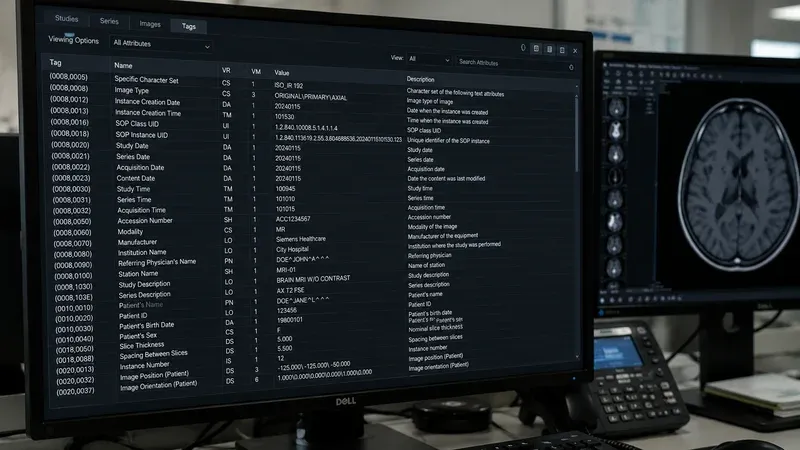
You can inspect VRs of any DICOM file with our DICOM Tag Viewer. For background on the tag structure itself, see our field reference for radiology IT. For the closely related issue of vendor-specific tags, see our explanation of DICOM private tags.
How VRs Are Stored: Implicit vs Explicit
DICOM defines two transfer-syntax conventions that affect where the VR lives in the file:
- Implicit VR: The VR is not stored in the file. Each element is just
(group, element, length, value). The reader looks up the VR in the public data dictionary based on the tag. This is older and less robust because it cannot handle private tags whose VRs are unknown to the reader. - Explicit VR: The two-letter VR is stored in the file directly after the tag, before the value length. This is the modern default and what most modalities and PACS produce today.
When parsing fails on a private tag, the cause is often that the file uses implicit VR and the reader has no entry for the private tag in its dictionary. Switching to explicit VR transfer syntax during export usually resolves this.
String VRs: The Most Common Categories
The majority of DICOM tags carry text data, encoded as ASCII or, since the standard added Specific Character Set support, as ISO_IR character sets and Unicode. Here are the string VRs you see most often in radiology metadata:
LO — Long String (max 64 characters)
A free-form text string up to 64 characters. Used for human-readable identifiers like Manufacturer (0008,0070), Manufacturer’s Model Name (0008,1090), and Series Description (0008,103E). Whitespace is significant only inside the string — leading and trailing spaces are usually stripped by readers.
SH — Short String (max 16 characters)
Same idea as LO but capped at 16 characters. Used for codes and short identifiers like Accession Number (0008,0050) and Station Name (0008,1010). The 16-character limit catches teams who try to put long identifiers from external systems into accession numbers; values longer than 16 characters are non-conformant.
LT — Long Text (max 10240 characters)
Free-form text for longer fields like Image Comments (0020,4000) or Study Comments (0032,4000). Allows newlines and most printable characters. Often where free-text PHI ends up if technicians type clinical context into comment fields.
ST — Short Text (max 1024 characters)
Like LT but shorter. Used for Institution Address (0008,0081) and similar mid-length descriptive fields.
UT — Unlimited Text
No length limit. Used for very long descriptive fields, like Pixel Data Provider URL (0028,7FE0) in some scenarios. The length field for UT is 4 bytes wide instead of 2.
CS — Code String (max 16 characters)
An enumerated code drawn from a defined set of values, e.g., Modality (0008,0060) with values like “CT”, “MR”, “US”, “XA”, “CR”. CS values are uppercase, may not contain leading or trailing spaces, and are limited to a small alphabet (uppercase letters, digits, space, underscore). This is one of the most strictly validated VRs.
UI — Unique Identifier (max 64 characters)
A dotted-decimal OID-style identifier. Used for every UID in DICOM: Study Instance UID, Series Instance UID, SOP Instance UID, SOP Class UID, Transfer Syntax UID. UI values consist only of digits and dots, must not have leading zeros in components, and must be globally unique.
Person Name VR: PN
The PN VR encodes structured person names. Components are separated by caret characters in this order: family^given^middle^prefix^suffix. Multiple variants — alphabetic, ideographic, phonetic — are separated by equal signs.
Examples:
DOE^JOHN^A— family DOE, given JOHN, middle ASMITH^JANE^^DR— family SMITH, given JANE, no middle, prefix DRYAMADA^TARO=山田^太郎— alphabetic = ideographic representation
PN is one of the most common sources of bugs. Display layers must un-caret the components to render “Doe, John A.” while preserving the canonical form for matching. Migration scripts that naively trim or reformat names break worklist matches.
Date and Time VRs: DA, TM, DT
DA — Date (8 characters)
Format: YYYYMMDD. Example: 19650715 means July 15, 1965. Used for Patient’s Birth Date (0010,0030), Study Date (0008,0020), and similar. There is no separator and no time zone; the date is interpreted in the timezone of the originating site.
TM — Time (max 14 characters)
Format: HHMMSS.FFFFFF with optional fractional seconds. Example: 143000 is 14:30:00. Older systems may emit 14:30:00 with colons; conformant DICOM uses no separators.
DT — DateTime (max 26 characters)
Combined format: YYYYMMDDHHMMSS.FFFFFF&ZZXX, where the optional suffix &ZZXX encodes the UTC offset (+0500, -0800, etc.). DT is used for fields like Acquisition DateTime (0008,002A) where sub-second precision and timezone matter for synchronization across modalities.
Numeric VRs: DS, IS, US, SS, UL, SL, FL, FD
- DS — Decimal String: A number stored as ASCII text, e.g.,
"112.5". Used for Pixel Spacing, Slice Thickness, and many measurement fields. Easy to read but allows multiple textual representations of the same value ("1.0"vs"1"vs"1.00"). - IS — Integer String: An integer stored as ASCII text, e.g.,
"256". Used for Series Number, Instance Number, Number of Frames. - US — Unsigned Short (16-bit): A binary 16-bit unsigned integer. Used for Rows
(0028,0010), Columns(0028,0011), and Bits Allocated(0028,0100). - SS — Signed Short (16-bit): A binary 16-bit signed integer. Less common; appears in some pixel-data-related fields.
- UL — Unsigned Long (32-bit): A binary 32-bit unsigned integer. Used for Pixel Data length and large counters.
- SL — Signed Long (32-bit): A binary 32-bit signed integer.
- FL — Floating Point Single (32-bit IEEE 754): Used for some calibration and orientation fields.
- FD — Floating Point Double (64-bit IEEE 754): Used for high-precision floating-point fields like ROI volumes or detailed timing.
The distinction between string-encoded numerics (DS, IS) and binary numerics (US, UL, FL, FD) matters because the encoding rules and length calculations differ. DS and IS support multi-valued elements separated by backslash \\; binary numerics use raw byte arrays.
Binary VRs: OB, OW, OF, OD, OL
These VRs carry binary blobs whose interpretation depends on context:
- OB — Other Byte: A stream of bytes. Used for compressed pixel data, certain private blobs, and the Pixel Data element
(7FE0,0010)when stored as bytes. - OW — Other Word (16-bit): A stream of 16-bit words. Used for Pixel Data when each pixel is stored as a 16-bit value.
- OF — Other Float (32-bit): A stream of 32-bit floats.
- OD — Other Double (64-bit): A stream of 64-bit doubles.
- OL — Other Long (32-bit): A stream of 32-bit unsigned integers.
SQ — Sequence: The Recursive VR
The Sequence VR is one of the most important and most misunderstood. SQ holds a list of zero or more items, where each item is itself a complete dataset of tags. Sequences appear throughout DICOM — in Referenced Image Sequence, Coding Scheme Identification Sequence, Procedure Code Sequence, and many others.
Schematically:
(0040,0260) SQ  Performed Protocol Code Sequence
  Item 1
    (0008,0100) SH  Code Value     "CT-ABD-CON"
    (0008,0102) SH  Coding Scheme  "LOCAL"
    (0008,0104) LO  Code Meaning   "CT Abdomen with Contrast"
  Item 2
    (0008,0100) SH  Code Value     "CT-ABD-NOC"
    ...
Reading SQ correctly requires recursive parsing: the parser enters each item, reads its child elements as if they were a top-level dataset, then exits. Tools that flatten sequences into a single list lose the structure and may produce misleading reports.
Other Useful VRs
- AS — Age String (4 characters): Format
nnnD,nnnW,nnnM, ornnnYfor days, weeks, months, or years. Used for Patient’s Age(0010,1010). - AE — Application Entity (max 16 characters): An AE Title used in DICOM network associations. Case-sensitive.
- AT — Attribute Tag: A tag value used as data, useful in tag-pointer fields.
- UC — Unlimited Characters: Like SH/LO but with no length cap; introduced more recently.
- UR — URI/URL: An RFC 3986 URI, used in fields that reference external resources.
Common VR Pitfalls in Practice
- Truncated SH values: Putting a 20-character accession number into the 16-character SH limit leads to truncation or rejection. Either shorten the source identifier or move it to an LO field.
- Mixed-case CS values: Some legacy systems emit lowercase CS values like “ct”. Strictly conformant readers may reject these. Normalize to uppercase before transmission.
- Date format drift: Older systems may emit DA values like
1965-07-15with separators. Modern PACS expect raw19650715. - PN component order: Mixing up family and given when caret-separating PN values produces names that display reversed in viewers.
- DS rounding: Decimal Strings can encode values to many digits; round-tripping through binary floats and back to DS can cause precision drift.
- Implicit VR with private tags: If a file uses implicit VR transfer syntax and contains private tags the reader doesn’t know, those values may render as raw bytes or be skipped entirely.
Best Practices for Working with VRs
- Always inspect the VR alongside the value when debugging. A “weird” value usually has a perfectly correct VR that explains it.
- Prefer explicit VR transfer syntaxes for export, especially when private tags are involved.
- Validate string lengths against VR limits before writing or transmitting. Many bugs are caught here.
- Use the standard’s public data dictionary as the single source of truth for VRs of public tags. Do not infer.
- For SQ fields, preserve item order during processing; downstream consumers may rely on it.
- When handling DA / TM / DT values, store them in canonical form internally and only format for display.
Conclusion
Value Representations are the grammar that turns a sea of hex bytes into typed, interpretable data. Mastering the common VRs — LO, SH, CS, UI, PN, DA, TM, DS, IS, US, OB, SQ — and their constraints is essential for anyone debugging DICOM, building integrations, or migrating archives. Use a viewer that exposes the VR alongside the value, validate inputs against VR rules, and treat string-length limits and component separators with respect. Continue with our companion articles on DICOM private tags and DICOM tag encoding on disk, and the tag field reference for the broader context.