
Introduction: Why HIPAA Questions Keep Showing Up in Imaging Tool Selection
Every radiology department, imaging vendor, AI research team, and healthcare integration group eventually asks the same question: is this imaging tool HIPAA compliant? The question sounds simple, but the real answer is more nuanced. HIPAA does not certify software products, and it does not publish a list of approved DICOM viewers, metadata inspectors, or de-identification utilities. Instead, HIPAA defines privacy, security, and breach-notification obligations for covered entities and business associates. Whether a medical imaging tool fits into a compliant workflow depends on what data it touches, where processing happens, whether Protected Health Information (PHI) leaves the organization, what logs are retained, and what contracts govern the vendor relationship.
That matters because DICOM files are unusually rich from a privacy perspective. A single study can contain direct identifiers in metadata, indirect identifiers in workflow tags, and even burned-in PHI in the pixel data itself. A viewer that appears harmless from a user-interface standpoint may still create compliance risk if it uploads files to a remote server, stores thumbnails in a cloud cache, sends analytics events containing study identifiers, or keeps temporary copies outside your security boundary. Conversely, a privacy-first browser tool that processes everything locally may be much easier to approve because PHI never crosses the network at all.
This guide explains how HIPAA applies to medical imaging tools in practical terms. We will cover the distinction between privacy and security rules, what counts as a Business Associate, when a Business Associate Agreement (BAA) is required, how DICOM metadata complicates risk analysis, and how to evaluate viewers, tag inspection tools, and de-identification workflows. If you need a hands-on companion while reading, you can open a file in our DICOM Tag Viewer, inspect rendered studies in the DICOM Image Viewer, and test metadata cleanup in the DICOM De-Identifier.
HIPAA Basics: What the Law Actually Regulates
HIPAA is often treated as a generic privacy label, but the operational details come from three interlocking areas. The Privacy Rule governs permissible use and disclosure of PHI. The Security Rule requires administrative, physical, and technical safeguards for electronic PHI (ePHI). The Breach Notification Rule governs what happens if PHI is accessed, disclosed, or exfiltrated improperly. Software tools matter because they sit inside the technical-safeguards layer: access control, transmission security, auditability, integrity, workstation use, and data minimization.
Medical imaging workflows usually involve all three. A radiologist opens a study containing PHI. A PACS administrator exports a set of cases for vendor testing. A research coordinator de-identifies DICOM before sending it to a collaborator. An integration analyst uploads a malformed study to a vendor support portal to troubleshoot a rendering issue. Each scenario involves PHI, but the compliance implications differ depending on whether the recipient is internal or external, whether the data remains identifiable, and whether the tool processes data locally or remotely.
That is why asking whether a tool is "HIPAA compliant" is less useful than asking a sequence of operational questions: Does PHI leave the workstation? Is the vendor creating, receiving, maintaining, or transmitting PHI on behalf of a covered entity? Are temporary files stored locally or remotely? Are access logs and audit trails available? Is de-identification applied before export? The best imaging tools make these answers obvious by design.
Where PHI Lives in Medical Imaging
Imaging teams sometimes underestimate how much identifying data sits inside a DICOM object. Patient Name (0010,0010), Patient ID (0010,0020), Birth Date (0010,0030), Accession Number (0008,0050), Referring Physician Name (0008,0090), Institution Name (0008,0080), Study Date (0008,0020), and many other fields can directly or indirectly identify a patient. Even when obvious demographic fields are removed, Study Description, Series Description, Protocol Name, station identifiers, or unique device IDs may still create linkage risk in small cohorts or specialty workflows.
The pixel data can create even more complications. Portable X-ray systems, ultrasound devices, CR workflows, and secondary capture objects may burn patient name, medical record number, or acquisition timestamp directly into the image. Head CT, facial dermatology, and some ophthalmology workflows may reveal recognizable anatomy. Structured Reports and dose reports can carry free text, operator names, and procedural details. HIPAA evaluation therefore cannot stop at the file extension level. A DICOM file is not just an image; it is a dense clinical container with multiple layers of privacy exposure.
This is why metadata inspection tools matter so much operationally. Before approving a workflow, compliance teams need a way to verify what the file actually contains. A tag viewer makes it possible to inspect direct identifiers, private tags, UIDs, and acquisition metadata in minutes. Without that visibility, risk analysis becomes guesswork.
Local Processing vs Cloud Processing: The Biggest Practical Split
From a HIPAA perspective, one design choice dominates all others: does the tool process PHI locally or on a remote service? A local-only viewer or parser runs entirely inside the user workstation or browser session. The DICOM bytes are read from local storage into memory, processed on the device, and never transmitted to a vendor-controlled environment. In that architecture, there may be no disclosure of PHI to a third party at all. That does not eliminate all compliance obligations, because the organization still must secure the workstation, browser, and surrounding environment, but it radically reduces contractual and transmission risk.
Cloud-based imaging tools create a different compliance profile. The moment a DICOM study is uploaded to a vendor-controlled server, the vendor may be creating, receiving, maintaining, or transmitting ePHI on behalf of the covered entity. That usually makes the vendor a Business Associate and triggers BAA requirements. It also raises new questions about region of storage, retention period, subprocessors, logging, access control, encryption at rest, disaster recovery, and incident response. Some organizations can support that model with the right contracts and controls. Others cannot, especially for ad hoc troubleshooting or early-stage research workflows.
In practice, this means client-side imaging tools are often the fastest path to a defensible workflow. If the organization can prove that no PHI leaves the device, then many of the hard vendor-management questions disappear. That does not magically certify the tool, but it gives security and compliance stakeholders a much narrower risk surface to assess.
When a Business Associate Agreement Is Required
A Business Associate Agreement is required when a vendor handles PHI on behalf of a covered entity or another business associate. For imaging tools, that usually includes hosted PACS platforms, cloud viewers, managed de-identification services, vendor support portals that receive identifiable studies, outsourced storage, and analytics systems that ingest raw DICOM metadata. If the vendor can access or store identifiable studies, you should assume a BAA conversation is necessary unless counsel determines otherwise.
By contrast, purely local software may not require a BAA if the vendor never receives PHI. A browser-based viewer that runs entirely client-side and makes no network requests during processing can often be used without disclosing PHI to the software provider. The legal analysis still belongs with the organization's privacy or legal team, but the architecture is far easier to defend. This distinction is why privacy-first tooling matters: it changes not just technical risk, but procurement complexity, contract cycle time, and governance overhead.
It is also important to understand that "we do not look at your data" is not the same thing as "we are not a Business Associate." If the vendor stores it, can access it, or transmits it, HIPAA may still apply. The decisive question is what the system can do and what relationship the vendor has to the covered entity's workflow, not just what the vendor says it intends to do.
Evaluating Viewers, Metadata Tools, and De-Identification Utilities
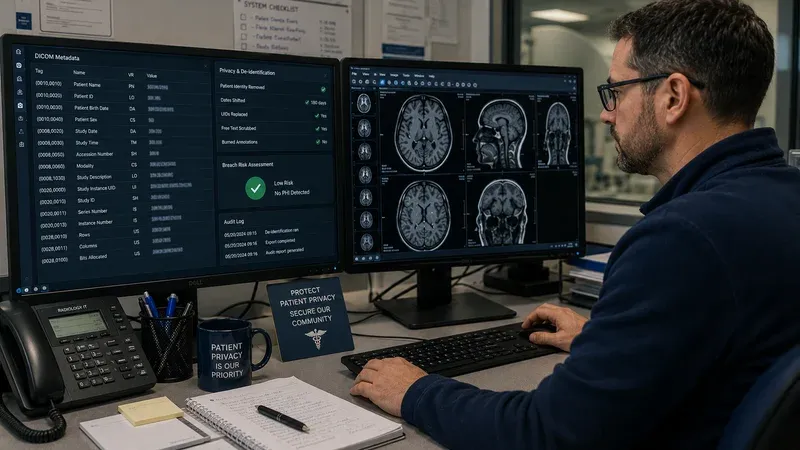
Different imaging tools create different compliance questions. A DICOM viewer should be evaluated for local rendering, caching behavior, logging, download controls, and whether screenshots or exported PNG files create secondary PHI copies. A tag inspection tool should be evaluated for whether it uploads metadata for parsing, whether search telemetry includes tag values, and whether exports are written to disk automatically. A de-identification utility must be evaluated not only for privacy architecture but also for whether it actually removes the right fields, handles private tags, rewrites UIDs correctly, and documents what it changed.
The safest workflows usually combine these tools rather than relying on a single opaque utility. First inspect a study in a tag viewer. Then apply de-identification rules in a local tool. Then reopen the output to verify that identifiers were removed or replaced as expected. If pixel-level PHI may exist, add a visual review in an image viewer before release. That sequence creates a defensible control loop: inspect, transform, verify, then share.
It also creates better evidence for audits and protocol reviews. Instead of saying "we anonymized the file," the team can say: we scanned the metadata, removed direct identifiers, rewrote UIDs, removed private tags, confirmed Patient Identity Removed and De-identification Method fields, and visually inspected modalities known to burn text into the pixels. That is a much stronger operational story.
HIPAA Safe Harbor, Expert Determination, and Imaging Reality
The HIPAA Privacy Rule recognizes two ways to de-identify data. Safe Harbor removes 18 categories of identifiers. Expert Determination uses a qualified expert to conclude that the risk of re-identification is very small. In imaging, Safe Harbor is attractive because it is concrete: remove names, dates, identifiers, device serial numbers, and other listed categories. But DICOM complicates implementation because the 18 categories map to many different tags, plus private tags and pixel overlays that are not always obvious to non-imaging teams.
Expert Determination can be useful for research programs that need to retain some temporal or technical detail, but it is not a shortcut around basic hygiene. If obvious patient identifiers remain in a DICOM header, no expert report will rescue a careless workflow. The right pattern is to treat tag-level cleanup, private-tag review, UID replacement, and pixel review as the baseline, then decide whether additional statistical controls are needed for the specific dataset.
Our DICOM De-Identifier is designed for the baseline layer: local processing, identifier removal, and transparent result review. It is not a substitute for institutional policy or legal review, but it gives teams a practical way to implement the controls they already know they need.
Access Control, Auditability, and Workstation Practices
Even the most privacy-conscious local tool can be used unsafely if workstation controls are weak. HIPAA technical safeguards still require attention to user authentication, session control, device security, screen visibility, local storage hygiene, and auditability. If a research coordinator downloads de-identified exports to an unsecured personal laptop, compliance risk remains. If a hospital workstation leaves browser downloads in a shared folder, local-only processing does not prevent secondary disclosure.
For imaging teams, good practice includes using managed devices when possible, minimizing automatic downloads, restricting export permissions to approved workflows, and documenting when identifiable studies are copied for troubleshooting or validation. Where institutional policy allows, ephemeral browser tools reduce the number of installed binaries and local caches that IT has to maintain. But they should still be paired with clear workstation-use standards.
Auditability matters here too. If a workflow requires proof that PHI was removed before external sharing, teams need a documented checklist or result record. Some organizations log the date, operator, study set, de-identification profile, and verification step in a research data-management system. Others store only the transformed files and SOP. The tooling should support that operational discipline rather than obscuring it.
Common Imaging Scenarios and the Right HIPAA Questions
PACS migration validation: Can engineers compare pre- and post-migration studies without uploading files to a third party? A local tag viewer and image viewer are ideal because they let the team inspect metadata integrity and rendering behavior without external disclosure.
Vendor support case: Does the vendor require a real patient study to reproduce a bug? If so, can the study be de-identified first, and will burned-in pixel text also be reviewed? If identifiable data must be transferred, is there a BAA and secure transfer path?
Research dataset release: Has the team removed direct identifiers, reviewed private tags, replaced UIDs appropriately, and confirmed that pixel data does not contain overlays or recognizable anatomy beyond the protocol's risk tolerance?
Education and training archive: Are cases de-identified before leaving the clinical archive, and are exported PNG or JPEG derivatives also reviewed for residual identifiers in the visible image area?
Framing HIPAA in scenario form helps teams move from generic fear to concrete controls. Most compliance problems in imaging do not come from ignorance of the law; they come from fuzzy workflow boundaries and tool choices that make data movement too easy.
How to Build a Defensible Imaging Toolchain
A practical HIPAA-friendly imaging toolchain usually follows five steps. First, inspect incoming studies with a local metadata viewer. Second, classify whether the use case is internal troubleshooting, external vendor escalation, research sharing, or teaching distribution. Third, apply the appropriate de-identification profile locally. Fourth, verify the output in both a tag viewer and, when necessary, an image viewer. Fifth, document what was done and why.
This model works because it creates clear control points. The tag viewer answers "what identifiers are here?" The de-identifier answers "what changed?" The image viewer answers "does anything visible remain?" And the SOP or checklist answers "who approved release and under what rule set?" Each step is understandable to security, privacy, operations, and research stakeholders, which is exactly what you want in a YMYL healthcare domain.
It also integrates well with broader governance. If a future incident occurs, the organization can show not only that it had a policy, but that the workflow and tools were structured to reduce disclosure risk by default.
Conclusion
HIPAA compliance for medical imaging tools is not about a badge on a website. It is about architecture, workflow design, and disciplined handling of DICOM content. Tools that process PHI locally, avoid unnecessary transmission, make metadata visible, and support verification steps are easier to fit into compliant workflows than opaque services that require uploads and vendor-side storage. For radiology IT, research imaging, and clinical engineering teams, that difference is enormous.
If you are evaluating your current workflow, start with the simplest question: where does the DICOM data go? If the answer is "nowhere beyond the user's device," your risk surface is already much smaller. From there, pair local inspection, local de-identification, and explicit verification to create a process that is technically sound and operationally defensible. Our DICOM Tag Viewer, DICOM Image Viewer, and DICOM De-Identifier are designed around exactly that principle: useful imaging workflows without unnecessary PHI disclosure.