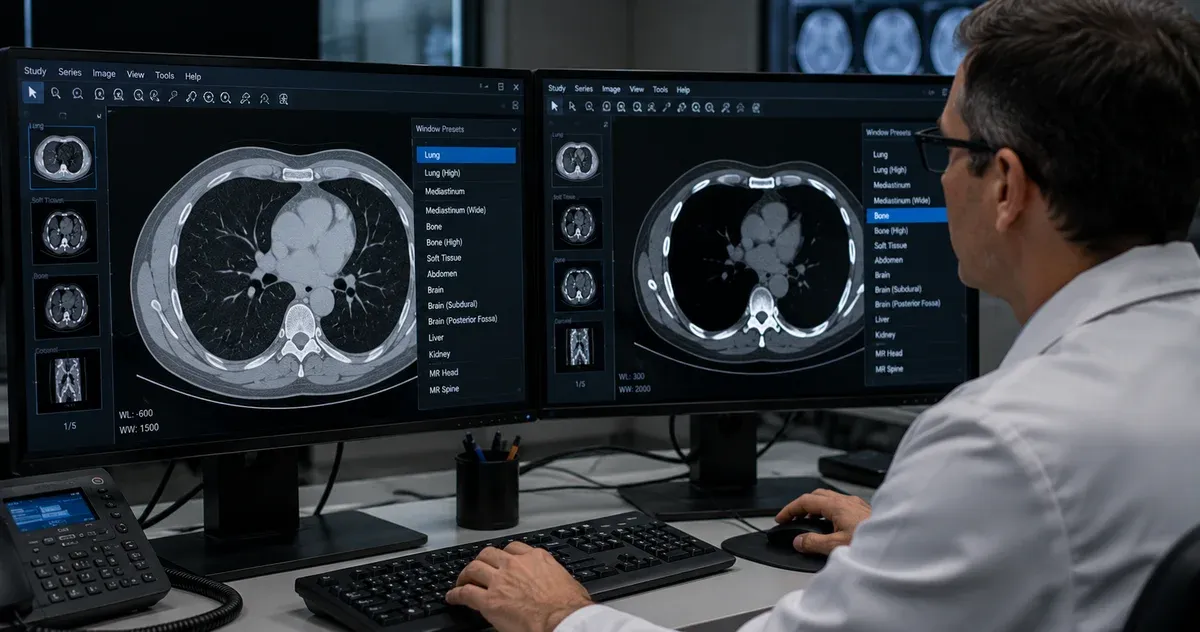
What Is DICOM Windowing and Why Does It Matter?
Medical imaging devices — CT scanners, MRI systems, digital radiography units — produce data with far more gray-level depth than any monitor can display at once. A standard CT scanner produces pixel values spanning roughly 4,000 discrete gray levels, from −1024 (air) to +3071 (dense bone or metal). A typical computer display can show only 256 gray levels at once. If a viewer tried to map all 4,000 levels directly to 256 display shades, the contrast between similar tissues would be virtually invisible to the human eye.
DICOM windowing — also called window/level adjustment — solves this problem by allowing the radiologist or technologist to select a narrow range of gray values and stretch it across the full 0–255 display range. Values outside that range are clipped to pure black or pure white. The result is dramatically improved contrast for the tissue type of interest, revealing subtle pathologies that would otherwise be invisible.
Understanding windowing is essential for anyone working with medical images: radiologists interpreting clinical studies, healthcare IT professionals configuring PACS workstations, researchers processing datasets, and developers building imaging tools. This guide covers the underlying mathematics, the clinical standard presets used every day in radiology departments, and how to apply windowing effectively in our free online DICOM Image Viewer.
The Two Parameters: Window Center and Window Width
Windowing is defined by exactly two numeric parameters stored in every DICOM image file:
- Window Center (WC) — also called the level — is the pixel value that maps to middle gray on the display. It defines what the "center of interest" is in the grayscale range.
- Window Width (WW) — also called the width or contrast — defines the total span of pixel values that will be visible. Values below
WC − WW/2are displayed as solid black; values aboveWC + WW/2are displayed as solid white.
The linear mapping for any pixel value v is:
- If v ≤ WC − WW/2 → display value = 0 (black)
- If v ≥ WC + WW/2 → display value = 255 (white)
- Otherwise → display value = ((v − WC + WW/2) / WW) × 255
This formula is defined in the DICOM standard (PS 3.3, C.11.2.1.2 — the VOI LUT Module). Default window values for a specific image are stored in the Window Center tag (0028,1050) and Window Width tag (0028,1051). Many DICOM images include multiple presets — separated by backslash characters in the tag value — corresponding to different anatomical structures. Viewers typically offer these as a selectable dropdown.
Hounsfield Units: The CT Windowing Scale
CT scanners report pixel values in Hounsfield Units (HU), a calibrated, linear scale based on the attenuation of X-rays relative to water. The scale is defined so that water = 0 HU and air = −1000 HU. Every material has a characteristic HU range:
- Air: approximately −1000 HU
- Fat: −120 to −60 HU
- Water / CSF: 0 to 15 HU
- Soft tissue (muscle): 40 to 80 HU
- Contrast-enhanced vessels: 150 to 300 HU
- Cortical bone: 400 to 1,000 HU
- Dense bone / calcifications: 800 to 3,000 HU
- Metal implants: often above 3,000 HU
Because HU values are calibrated, standard clinical window presets work reliably across scanners from different manufacturers and different facilities. A lung window set to WC = −600, WW = 1500 will show the same relative tissue contrast whether the scan was acquired on a Siemens, GE, Philips, or Canon scanner — as long as the scanner is properly calibrated.
MRI images do not use Hounsfield Units. MRI pixel values are arbitrary signal intensities that depend on the scanner, field strength, coil configuration, and pulse sequence parameters. Windowing in MRI is therefore more subjective, and preset values need to be adapted per-sequence or per-protocol rather than being universally applicable.
Standard CT Window Presets
Radiology departments worldwide use a set of standardized window presets for CT interpretation. While exact values vary slightly between institutions and vendors, the following are widely recognized clinical conventions:
Lung Window
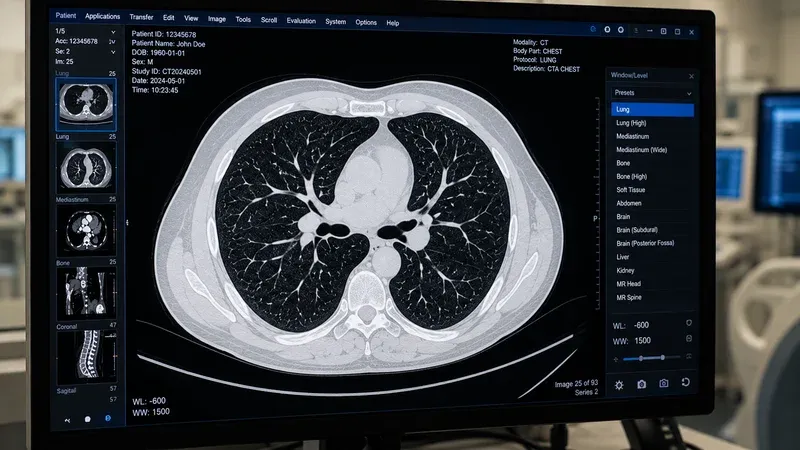
WC = −600, WW = 1500
The lung window is optimized for the pulmonary parenchyma. The wide window width captures the full range from air (−1000 HU) to soft tissue (0–80 HU), making bronchi, airways, pulmonary vessels, and interstitial structures clearly visible. Ground-glass opacities, consolidations, nodules, emphysema, and interstitial patterns are best assessed in the lung window. A narrow window would obscure the subtle density differences that distinguish these entities.
Mediastinum / Soft Tissue Window
WC = 40, WW = 400
The mediastinal or soft tissue window is centered on the attenuation of muscle and soft organs. It is used to evaluate the heart, great vessels, lymph nodes, thymus, pericardium, and chest wall. In abdominal CT, this window also applies for assessing the liver, spleen, kidneys, pancreas, and bowel. The relatively narrow width (400 HU) provides adequate contrast between fat (−80 HU), soft tissue (40–80 HU), and moderately calcified structures.
Bone Window
WC = 300–400, WW = 1500–2000
The bone window requires a high window center and wide width to accommodate cortical bone's high attenuation values (>400 HU). It is used to evaluate fractures, bony lesions, trabecular architecture, and cortical integrity. At these settings, soft tissues appear as nearly uniform dark gray, making soft tissue pathology invisible — but bone detail, including subtle cortical disruptions, becomes readily apparent.
Brain Window
WC = 40, WW = 80
The brain window uses a very narrow window width (80 HU) centered on normal brain parenchyma. This extreme narrowing exaggerates the contrast between gray matter (~35 HU), white matter (~25 HU), cerebrospinal fluid (0–15 HU), and acute hemorrhage (50–90 HU). Without this narrow window, early acute hemorrhage and subtle ischemic changes can be imperceptible. Brain CT is a classic example where windowing is critical for detecting life-threatening pathology.
Subdural Window
WC = 75, WW = 200
A supplementary window used alongside the brain window to improve detection of isodense or subacute subdural hematomas. These collections can be nearly invisible on standard brain windows because their HU values approximate surrounding brain parenchyma. The slightly broader, higher-centered subdural window reveals these collections.
Liver / Abdomen Window
WC = 60, WW = 160
Optimized for hepatic parenchymal assessment. The narrow width accentuates the subtle attenuation differences between normal liver (~60 HU), focal lesions, and metastatic deposits. Also useful for pancreatic and splenic evaluation. In portal venous phase CT, vessels enhance to ~150 HU, making them easily distinguishable from lower-attenuation liver parenchyma.
Stroke / Ischemia Window
WC = 32, WW = 8
An ultra-narrow window sometimes called the "Alberta Stroke Program Early CT Score" (ASPECTS) window. With a width of only 8 HU, it exaggerates microscopic attenuation differences between normal and ischemic brain tissue in the first hours after stroke — changes that are completely invisible at standard brain window settings. Use of this window requires careful technique to avoid over-interpretation of artifacts.
Window Presets for MRI
MRI windowing is modality-specific and protocol-dependent. Unlike CT, there is no universal calibrated scale, so presets stored in DICOM files represent the scanner's recommendation based on the acquisition parameters. However, some general principles apply:
- T1-weighted images: Fat appears bright (high signal); CSF appears dark (low signal). Window width is typically moderate, centered on soft tissue signal intensity.
- T2-weighted images: Fluid and edema appear bright; fat is moderately bright; muscle is dark. Wider windows are often needed due to the broader dynamic range of T2 sequences.
- FLAIR (Fluid-Attenuated Inversion Recovery): CSF is suppressed to dark; abnormal white matter lesions appear as hyperintense. Windows are adjusted to maximize contrast between normal white matter and perilesional edema.
- Diffusion-Weighted Imaging (DWI): Acute ischemia and hypercellular tumors appear bright. Window width is typically narrow to highlight restricted diffusion areas.
- Dynamic contrast-enhanced (DCE) MRI: Enhancement curves vary; windowing is adjusted per phase to visualize enhancing lesions against background parenchyma.
Because MRI values are not calibrated in absolute units, skilled radiologists continuously adjust window/level settings interactively during reporting, rather than relying solely on preset values.
Window Presets for Digital X-Ray (DR/CR)
Computed radiography (CR) and digital radiography (DR) systems store pixel values in a proprietary scale that varies by manufacturer and detector technology. However, DICOM-compliant systems typically include vendor-specific window presets that are optimized for the modality and exposure parameters.
For chest X-ray, a common preset uses a wide window (WW = 4000) centered on the middle of the pixel value range, roughly equivalent to showing both lung fields and mediastinum simultaneously. Extremity and bone radiographs use narrower windows highlighting bony detail. Many DR systems also apply image processing (such as edge enhancement and frequency processing) before windowing, which affects the final appearance independently of the WC/WW parameters.
When viewing DR or CR images in third-party viewers, it is important to use the Presentation LUT and VOI LUT information stored in the DICOM file, rather than applying ad hoc windowing, to reproduce the intended diagnostic appearance.
Multiple Window Presets in a Single DICOM File
The DICOM standard allows a single image to contain multiple window presets, stored as backslash-separated values in the Window Center and Window Width tags. For example, a thoracic CT might include three presets:
- Preset 1: WC = −600, WW = 1500 (lung)
- Preset 2: WC = 40, WW = 400 (mediastinum)
- Preset 3: WC = 350, WW = 1500 (bone)
Viewers that support multiple presets provide a dropdown menu or keyboard shortcuts to cycle through them. The Window Center Width Explanation tag (0028,1055) optionally contains human-readable labels (such as "LUNG" or "MEDIASTINUM") for each preset. Our DICOM Image Viewer reads these tags and displays all available presets, allowing quick switching while keeping the same image frame open.
Practical Tips for Using Windowing Effectively
Start with the standard preset, then adjust. For CT interpretation, always begin with the appropriate standard preset for the anatomical region. Then fine-tune the window width and center interactively if the standard preset does not adequately show the area of concern — for example, subtly reducing the window width to improve conspicuity of a small hepatic lesion.
Wider windows = better for diffuse pathology. Conditions that produce subtle, widespread changes (emphysema, interstitial lung disease, early ischemia) often require wide windows to capture the full distribution of abnormality. Narrow windows can make these changes look more dramatic than they are and introduce visual artifacts at the black/white clipping points.
Narrower windows = better for focal lesions. A narrow window width increases the perceived contrast between a focal lesion and adjacent normal tissue, improving detectability at the cost of global tissue visibility.
Beware of window width artifacts. Extremely narrow windows produce "pseudoenhancement" around vessels and artificially darken normal structures at the low end of the window, or artificially brighten structures at the high end. These are display artifacts from windowing, not true tissue changes.
Record and standardize presets. In clinical environments, standardized window presets should be configured in PACS workstations and applied consistently across readers. Inconsistent windowing is a source of inter-reader variability and can lead to missed findings when a lesion falls outside the displayed range.
How Our DICOM Image Viewer Handles Windowing
Our free online DICOM Image Viewer reads the Window Center and Window Width tags from your DICOM file and applies them automatically on load. If the file contains multiple presets, you can select any of them from the preset selector. You can also adjust the window interactively by dragging horizontally (to change width) and vertically (to change center), or by entering numeric values directly in the input fields.
All processing happens entirely in your browser — your medical images are never uploaded to any server. This makes the viewer suitable for reviewing patient-identifiable images in a privacy-compliant way, while still offering professional windowing capabilities comparable to desktop PACS workstations.
If you want to inspect which window presets are stored in a DICOM file, our companion DICOM Tag Viewer lets you look up tags (0028,1050), (0028,1051), and (0028,1055) directly, along with every other metadata tag in the file.
Conclusion
DICOM windowing is one of the most powerful tools in medical image interpretation. By selecting the right Window Center and Window Width, radiologists can reveal pathology that would be completely invisible at other settings. The standard clinical presets for CT — lung, soft tissue, bone, brain, liver — represent decades of accumulated clinical experience distilled into reproducible display parameters. Understanding the HU scale that underlies CT windowing, the different challenges of MRI windowing, and the practical tips for adjusting presets appropriately gives any imaging professional a solid foundation for diagnostic image review. Try the standard presets with your own DICOM files using our free viewer and see the difference each window makes.