
Introduction: Why Radiology IT Professionals Need to Understand DICOM Tags
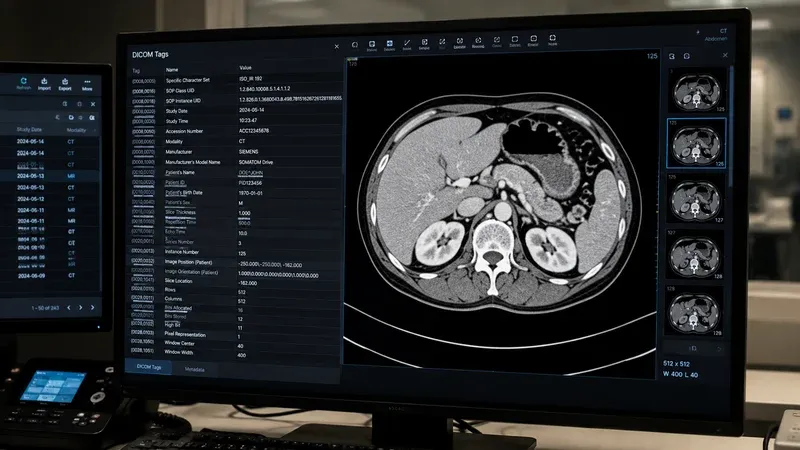
DICOM, the Digital Imaging and Communications in Medicine standard, is the universal language that allows medical imaging devices, PACS servers, viewing workstations, and cloud archives to exchange data reliably. At the heart of every DICOM file is a structured collection of tags — small labeled data fields that describe everything from the patient’s name and date of birth to the pixel spacing of a CT slice and the radiation dose delivered during an acquisition.
For radiology IT professionals, understanding DICOM tags is not optional. Tags are the key to troubleshooting failed imports, fixing broken worklists, mapping data between systems during migrations, and ensuring that patient demographics flow correctly from the RIS to the modality and back to the PACS. When an image “disappears” after being sent, or a study merges with the wrong patient, the root cause almost always lives in the tags.
This article provides a practical field reference. We will walk through the tag structure, the most important tag groups, Value Representations, private tags, and nested sequences. Whether you are debugging a DICOM conformance issue at the modality console or writing a migration script, this guide will help you read and interpret tags with confidence. You can follow along with any DICOM file using our online DICOM Tag Viewer.
DICOM Tag Structure: How to Read a Tag ID
Every DICOM tag is identified by a pair of 16-bit hexadecimal numbers written in the format (GGGG,EEEE), where GGGG is the group number and EEEE is the element number. For example, the tag for Patient Name is (0010,0010): group 0010, element 0010.
Group numbers organize tags by logical category. All patient-related tags share group 0010, all study-related date and time tags share group 0008, and so on. Element numbers distinguish individual fields within that group. Together, the group and element form a globally unique identifier that every DICOM-compliant system interprets the same way.
Tags are stored in the file in ascending order by group and then by element. This predictable layout means a DICOM parser can scan through the binary stream efficiently, reading group, element, Value Representation (VR), length, and value for each tag in sequence. Most modern DICOM files use explicit VR encoding, meaning the two-character VR code is written into the file alongside each tag. Older files may use implicit VR encoding, where the parser must look up the VR in a data dictionary based on the tag ID alone.
Understanding this structure is the first step to reading raw DICOM data in a hex editor or debugging transfer syntax issues between systems.
Patient-Level Tags (Group 0010)
Patient-level tags describe the individual who was imaged. These fields are populated at registration time (from the RIS or HIS worklist) or entered manually at the modality console. They are among the most important tags for data integrity, because errors here lead to misidentified studies.
- (0010,0010) Patient Name — VR: PN. Uses the component format
LastName^FirstName^MiddleName^Prefix^Suffix. The caret character separates components. Many systems only populate the first two components, producing values likeDOE^JOHN. Alphabetic, ideographic, and phonetic representations can be separated by the equals sign for multi-script names. - (0010,0020) Patient ID — VR: LO. The primary identifier used to match studies to the correct patient in the PACS. This is typically the Medical Record Number (MRN). Leading zeros and whitespace handling differ across vendors, which is a frequent source of merge and split errors.
- (0010,0030) Patient Birth Date — VR: DA. Stored as an eight-character string in the format
YYYYMMDD, for example19850714for July 14, 1985. No separators are used. - (0010,0040) Patient Sex — VR: CS. Single character:
M,F, orO(other). Some systems leave this empty if not provided. - (0010,1010) Patient Age — VR: AS. A three-digit number followed by a unit character:
Y(years),M(months),W(weeks), orD(days). For example,045Yrepresents 45 years. This tag is computed at acquisition time and may differ from the calculated age based on birth date and study date. - (0010,1030) Patient Weight — VR: DS. Stored as a decimal string in kilograms, for example
72.5. Used by dose calculation algorithms and contrast injection protocols.
When troubleshooting patient-matching issues, always start with these tags. A single extra space in the Patient ID or a transposed digit in the birth date can cause a study to file under the wrong patient.
Study-Level Tags (Groups 0008 and 0020)
Study-level tags describe the imaging exam as a whole. They link the images to the radiology order and provide the temporal and institutional context.
- (0020,000D) Study Instance UID — VR: UI. A globally unique identifier for the study, formatted as a dot-separated string of numeric components (e.g.,
1.2.840.113619.2.55.3.604...). This UID is the primary key that ties all series and instances of an exam together. It must never be reused across different studies. - (0008,0020) Study Date — VR: DA. The date the study was started, in
YYYYMMDDformat. - (0008,0030) Study Time — VR: TM. The time the study started, formatted as
HHMMSS.FFFFFFwith optional fractional seconds. For example,143025.000000represents 2:30:25 PM. - (0008,1030) Study Description — VR: LO. A human-readable description of the exam, such as “CT CHEST W CONTRAST”. This field is often populated from the RIS order but can be overridden at the modality.
- (0008,0050) Accession Number — VR: SH. The order number assigned by the RIS. This is a critical tag for integration because it links the images back to the radiology order for reporting and billing. Accession Number mismatches are one of the most common causes of workflow disruptions.
- (0008,0090) Referring Physician Name — VR: PN. Uses the same component format as Patient Name. This field drives worklist routing in many PACS configurations.
- (0008,0080) Institution Name — VR: LO. The name of the facility where the study was performed. Important for multi-site organizations to track the origin of studies.
Series-Level Tags
Within a study, images are organized into series. Each series typically represents a single acquisition run on the modality, for example a sagittal T1-weighted MRI sequence or an axial CT series at a specific reconstruction kernel.
- (0020,000E) Series Instance UID — VR: UI. The globally unique identifier for the series. All images acquired in the same run share this UID.
- (0020,0011) Series Number — VR: IS. An integer that orders series within the study. The modality assigns these sequentially, but they are not guaranteed to be contiguous.
- (0008,103E) Series Description — VR: LO. A human-readable label like “AX T2 FLAIR” or “LUNG 1.25mm”. Technologists can edit this at the console, and it drives hanging protocol matching in many viewers.
- (0008,0060) Modality — VR: CS. A coded value indicating the imaging device type:
CT,MR,US,CR,DX,MG,PT,NM,XA,RF,SR(Structured Report),KO(Key Object Selection), and many others. This tag is essential for routing, hanging protocols, and analytics. - (0018,0015) Body Part Examined — VR: CS. A coded string like
CHEST,HEAD,ABDOMEN, orEXTREMITY. Used for study categorization and analytics dashboards. - (0018,1030) Protocol Name — VR: LO. The name of the acquisition protocol configured on the modality, such as “ROUTINE BRAIN” or “CHEST PA AND LAT”. Protocol Name is valuable for quality assurance and dose monitoring programs.
Instance-Level Tags
Instance-level tags describe individual images (or other DICOM objects like structured reports and presentation states). These tags carry the technical imaging parameters and pixel-level metadata.
- (0008,0018) SOP Instance UID — VR: UI. The globally unique identifier for this specific instance. Every DICOM object in the world should have a unique SOP Instance UID.
- (0008,0016) SOP Class UID — VR: UI. Identifies the type of DICOM object — for example, CT Image Storage (
1.2.840.10008.5.1.4.1.1.2), MR Image Storage, or Structured Report Storage. The SOP Class tells the receiving system how to interpret the data. - (0020,0013) Instance Number — VR: IS. An integer that orders instances within a series. In a CT scan, this typically corresponds to the slice position from first to last.
- (0020,0032) Image Position (Patient) — VR: DS. A three-value string specifying the x, y, and z coordinates (in millimeters) of the upper-left pixel of the image in the patient coordinate system. This tag is critical for multi-planar reconstruction (MPR) and 3D rendering.
- (0028,0030) Pixel Spacing — VR: DS. Two decimal values representing the physical distance in millimeters between the centers of adjacent pixels, row spacing first, then column spacing. Measurements and calibration tools rely on this tag being accurate.
- (0028,0010) Rows and (0028,0011) Columns — VR: US. The height and width of the image matrix in pixels. A 512 × 512 CT image will have Rows = 512 and Columns = 512.
Value Representations (VR) Explained
Every DICOM tag has a Value Representation that defines the data type and format of its value. Understanding VRs is essential when you encounter unexpected data or need to create or modify tags programmatically. Here are the most common VRs you will encounter:
- DA (Date) — Eight characters:
YYYYMMDD. No separators. Example:20260317. - TM (Time) — Up to 14 characters:
HHMMSS.FFFFFF. Fractional seconds are optional. Example:091530.000000. - PN (Person Name) — Component groups separated by carets:
Last^First^Middle^Prefix^Suffix. Up to three character-set groups separated by equals signs for multi-script support. - UI (Unique Identifier) — A dot-separated string of numeric components, maximum 64 characters. UIDs must be globally unique. Root prefixes are assigned by standards organizations or derived from the organization’s OID.
- LO (Long String) — Up to 64 characters of text. Leading and trailing spaces are not significant. Used for descriptions, names, and identifiers.
- CS (Code String) — Up to 16 characters, uppercase letters, digits, spaces, and underscores only. Used for coded values like Modality (
CT,MR) and Patient Sex (M,F). - DS (Decimal String) — A string representing a floating-point number, maximum 16 characters. Example:
0.976562for pixel spacing. Despite containing a number, it is stored as text. - IS (Integer String) — A string representing an integer, maximum 12 characters. Example:
512for Rows. Like DS, it is stored as character data. - SQ (Sequence) — A container that holds one or more items, each of which is a nested set of DICOM tags. Sequences allow complex structured data, such as dose reports, referenced image lists, and coded terminology entries. We discuss sequences in detail below.
- OB / OW (Other Byte / Other Word) — Binary data, most commonly used for pixel data in tag
(7FE0,0010). OB stores byte-aligned data, OW stores 16-bit word-aligned data. Pixel data can be uncompressed or encapsulated in a transfer syntax like JPEG 2000 or JPEG Lossless.
When a tag value looks garbled in a viewer, the first thing to check is whether the VR is being interpreted correctly. An implicit VR file opened with the wrong data dictionary, or a private tag whose VR is unknown, can produce nonsensical displays.
Private Tags: Vendor-Specific Extensions
The DICOM standard reserves odd-numbered groups for private tags. Vendors like GE, Siemens, Philips, and Canon use private tags to store proprietary information that does not fit into the standard data dictionary — for example, raw data pointers, reconstruction parameters, dose reduction algorithm settings, or AI-generated annotations.
A private tag follows the same (GGGG,EEEE) format, but the group number is odd: (0009,xxxx), (0019,xxxx), (7005,xxxx), and so on. Before using elements in a private group, the creator must register a Private Creator tag in elements 0010–00FF of that group. The Private Creator value is a string identifying the vendor or software module, such as SIEMENS CT VA0 COAD or GEMS_GENIE_1.
When you encounter private tags in a viewer, you will typically see the raw hexadecimal tag ID and the value, but without a human-readable name unless the viewer has a vendor-specific dictionary loaded. Our DICOM Tag Viewer displays private tags clearly, showing the Private Creator identifier so you can determine which vendor or application created them.
Private tags are important during migrations and system upgrades. If you strip private tags during anonymization or routing, you may lose vendor-specific features like dose reports, advanced reconstruction metadata, or proprietary image enhancements. Always test with clinical data before implementing broad private tag removal policies.
Nested Sequences: The SQ Value Representation
Sequences (VR type SQ) are one of the most powerful — and most confusing — features of DICOM. A sequence tag contains one or more items, and each item is itself a mini DICOM dataset with its own tags. Sequences can be nested multiple levels deep.
Common use cases for sequences include:
- Structured Reports (SR) — Dose reports, measurement reports, and clinical findings are encoded as deeply nested sequences of coded entries, numeric measurements, and text values. The Content Sequence
(0040,A730)can contain dozens of nested items. - Referenced Image Sequences — Tags like
(0008,1115) Referenced Series Sequenceand(0008,1199) Referenced SOP Sequenceallow one DICOM object to point to specific images in other series or studies. Key Image Notes and Presentation States rely heavily on these references. - Request Attributes Sequence (0040,0275) — Carries the original order information from the RIS, including the Requested Procedure ID and Scheduled Procedure Step ID. Modality worklist matching depends on these values.
- Radiation Dose Reporting — CT Dose Reports use sequences to encode each irradiation event with its CTDIvol, DLP, and scan range. The Exposure Dose Sequence and CT Acquisition Details Sequence provide the data that dose-tracking systems ingest.
When exploring sequences in a tag viewer, look for the SQ indicator and expand each item to see its child tags. Understanding the hierarchy is essential for parsing structured reports or writing HL7/FHIR integration scripts that extract dose or measurement data from DICOM SR objects.
Quick Reference: 20 Essential DICOM Tags
| Tag | Name | VR | Description |
|---|---|---|---|
| (0010,0010) | Patient Name | PN | Patient’s full name in Last^First^Middle format |
| (0010,0020) | Patient ID | LO | Primary patient identifier (MRN) |
| (0010,0030) | Patient Birth Date | DA | Date of birth in YYYYMMDD format |
| (0010,0040) | Patient Sex | CS | M, F, or O |
| (0008,0020) | Study Date | DA | Date the study was started |
| (0008,0030) | Study Time | TM | Time the study was started |
| (0008,0050) | Accession Number | SH | RIS order number linking images to reports |
| (0008,1030) | Study Description | LO | Human-readable exam description |
| (0008,0060) | Modality | CS | Imaging device type (CT, MR, US, etc.) |
| (0008,0090) | Referring Physician | PN | Ordering physician name |
| (0020,000D) | Study Instance UID | UI | Globally unique study identifier |
| (0020,000E) | Series Instance UID | UI | Globally unique series identifier |
| (0008,0018) | SOP Instance UID | UI | Globally unique instance identifier |
| (0008,0016) | SOP Class UID | UI | Type of DICOM object (CT, MR, SR, etc.) |
| (0020,0013) | Instance Number | IS | Sequential number within the series |
| (0028,0010) | Rows | US | Image height in pixels |
| (0028,0011) | Columns | US | Image width in pixels |
| (0028,0030) | Pixel Spacing | DS | Physical distance between pixel centers (mm) |
| (0018,0015) | Body Part Examined | CS | Anatomical region (CHEST, HEAD, etc.) |
| (0008,103E) | Series Description | LO | Human-readable series label for hanging protocols |
Using a Tag Viewer to Explore DICOM Files
The fastest way to learn DICOM tags is to open a real file and browse its contents. Our DICOM Tag Viewer lets you drag and drop any .dcm file directly in your browser. The file is parsed entirely on your device — nothing is uploaded to a server — so you can safely inspect files containing protected health information.
When you load a file, the viewer displays every tag in the dataset with its group/element ID, name, VR, and value. You can search for specific tags by name or ID, expand nested sequences to see their child tags, and identify private tags by their odd group numbers and Private Creator labels. This makes it an invaluable tool for verifying that a modality is populating the correct fields, checking that anonymization scripts removed the right tags, or investigating why a study is not matching to the expected patient in your PACS.
For day-to-day radiology IT work, a tag viewer is as essential as a stethoscope is for a clinician. Keep one bookmarked and reach for it whenever a DICOM integration behaves unexpectedly.
DICOM Tag Morphing: What It Is and How to Detect It
One of the most consequential and least-discussed phenomena in radiology IT is DICOM tag morphing. The term refers to the silent rewriting, reformatting, or remapping of tag values as a study traverses different systems — modality → RIS → PACS → vendor-neutral archive → viewer. By the time the radiologist opens the study, individual tag values may differ from what the modality originally produced, and those differences are usually invisible unless you compare files explicitly.
DICOM tag morphing happens for many reasons, all of them well-intentioned at the system level. A PACS may rewrite Patient ID (0010,0020) to a normalized internal MRN. A migration tool may change Study Description (0008,1030) to match a destination dictionary. A de-identification pipeline may replace Patient’s Name (0010,0010) with a pseudonym while leaving Operator’s Name (0008,1070) untouched. A vendor-neutral archive may strip private tags whose creator dictionaries it does not recognize. Each transformation is sensible in isolation, but together they produce a study whose tags differ from the original adquisition byte for byte.
Why does tag morphing matter? Three concrete failure modes:
- AI training data drift: If a model was trained on studies from one PACS but is deployed against studies from another, morphed tags can degrade performance because cohort selection logic depends on Series Description, Body Part Examined, or institution-specific code values that no longer match.
- Migration audits fail: When you compare source and destination archives byte-for-byte after a migration, even minor tag morphing produces thousands of false-positive differences. Distinguishing intentional normalization from data loss becomes a slow forensic task.
- Hanging protocols break: Layouts that key off Series Description or private tags fall back to defaults when those tags are morphed or stripped, frustrating radiologists who suddenly see studies in unfamiliar arrangements.
Detecting tag morphing requires deliberate workflow. The simplest technique is to keep a reference copy of each study at the point of acquisition and periodically compare it against the same study’s state in the production archive. Our DICOM Tag Viewer makes this easy: load both versions of the file and visually scan the tag tables for differences in patient identifiers, study descriptions, and private elements. For systematic monitoring, a small script can hash the values of a curated subset of tags and flag any divergence over time. The DICOM Tag Browser is helpful when investigating which tags a particular system tends to morph, by reviewing the standard’s definitions alongside the values you observe.
If you find tag morphing in your environment, prioritize three remediations. First, document every transformation rule applied by intermediate systems so morphing becomes intentional rather than emergent. Second, preserve original values in private tags or a side channel so the original acquisition state can always be reconstructed. Third, treat any unexpected tag morphing as an integration defect and investigate it before it propagates to AI pipelines, research exports, or migration audits. Tag morphing is not inherently bad — it is often necessary for interoperability — but it must be visible, documented, and reversible.
Conclusion
DICOM tags are the foundation of every medical imaging workflow. From the patient demographics that ensure studies are filed correctly, to the technical parameters that enable accurate measurements and 3D rendering, tags carry the information that makes modern radiology possible.
By understanding the (group,element) structure, familiarizing yourself with the most important tag groups, knowing how Value Representations format data, and recognizing the role of private tags and sequences, you equip yourself to handle the integration challenges, troubleshooting calls, and migration projects that define radiology IT work. Bookmark this reference and use our DICOM Tag Viewer to put this knowledge into practice with real clinical data.