
Introduction: Why ACK Problems Are the Most Disruptive HL7 Failures
Of all the ways an HL7 interface can fail, acknowledgment failures are among the most operationally disruptive. A malformed segment is caught quickly because data is visibly wrong in the receiving system. A missing field shows up immediately in validation logs. But ACK failures can be invisible for hours or days — messages appear to be flowing, the interface engine shows active connections, and no application-level errors are logged — while quietly building a backlog of retransmitted messages that eventually overwhelms downstream systems.
ACK failure patterns fall into several distinct categories, each with a different root cause and a different diagnostic approach. This guide walks through the five most common HL7 ACK failure modes encountered in production healthcare interfaces, explains how to identify them from log evidence, and describes the corrective action for each.
Note: This article is for educational and technical reference. Interface configuration steps vary by engine version and vendor. Always follow your organization's change management procedures before modifying production interface configurations.
Failure Mode 1: ACK Timeout — No Response from Receiver
An ACK timeout occurs when the sending system transmits a message, waits for an acknowledgment within a configured timeout window, and receives no response. The sending system then retransmits the message after the retry interval, which may trigger another timeout, creating a retransmission loop.
Identifying the Pattern
In interface engine logs (Mirth Connect, Rhapsody, Ensemble), an ACK timeout appears as a repeated sequence of "message sent" events for the same MSH-10 control ID, separated by the configured retry interval (commonly 30–120 seconds), without any corresponding ACK receive event in between. The message queue depth grows as new messages are held behind the stuck transaction.
In Mirth Connect, this appears in the channel statistics as a high "Filtered" or "Queued" count with the same message cycling through retries. In Rhapsody, the route statistics show increasing retry counts for a specific transaction.
Common Causes
- Receiving system is down or unreachable: The TCP connection may be established (port open) but the application isn't processing incoming messages. This is the most common cause during maintenance windows.
- Receiving system queue is full: The receiver accepted the TCP connection but its internal processing queue is saturated, so no ACK is generated until a queue slot opens.
- ACK is generated but routed to the wrong destination: The ACK is produced but MSH-5/MSH-6 in the ACK are incorrect, routing it to a non-existent address. The sender never sees it.
- Network firewall or port block: The ACK is sent on a different port or protocol configuration than the sender is listening on.
Diagnostic Steps
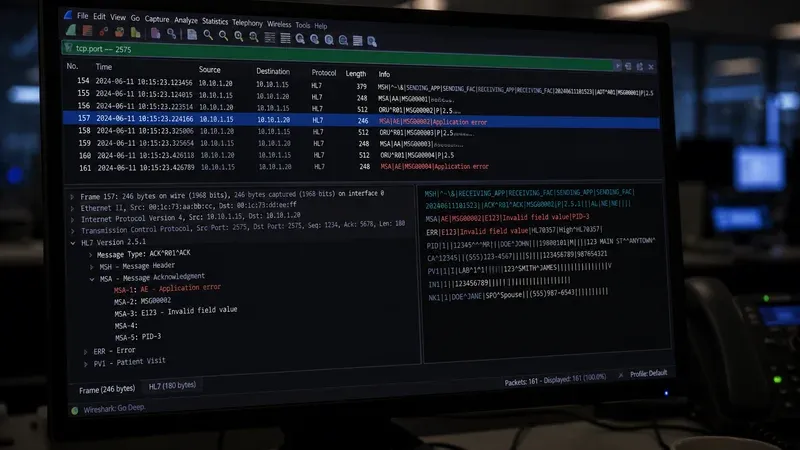
First, verify the receiving system is actually generating ACKs by checking its outbound message logs during the timeout window. If ACKs are being generated, capture the raw ACK at the network level (using Wireshark or the interface engine's raw message logging) and examine the MSH-5 and MSH-6 fields. If they don't match the sender's configured receiving address, the routing is wrong. If no ACKs are being generated, escalate to the receiving system's support team to investigate the processing queue or application availability.
Failure Mode 2: MSA-2 Mismatch — ACK Received But Not Matched
This is one of the most common and insidious ACK failure modes. The receiving system generates and sends a valid ACK, the sending system receives it, but the sending system cannot find the original transaction in its outbound queue — because MSA-2 in the ACK doesn't match MSH-10 in the original message.
Identifying the Pattern
In Mirth Connect logs, this appears as "ACK received — no matching message found for control ID [value]" or similar. In Rhapsody, the route log shows "Cannot correlate ACK to outbound message." The sending system continues to treat the original message as unacknowledged, retransmits it after the timeout, and the cycle repeats — even though the receiving system has successfully processed the message and keeps sending (now increasingly duplicate) ACK responses.
Common Causes
- Receiving system truncates the control ID: If the original MSH-10 is 20 characters and the receiving system's ACK generation code truncates to 15, the MSA-2 won't match.
- Receiving system modifies the control ID: Some poorly implemented receiving systems strip leading zeros, change separators, or otherwise transform the control ID before echoing it in MSA-2.
- Sending system generates control IDs inconsistently: If the sending system uses a timestamp-based control ID and the timestamp precision differs between the stored value and the log, the matching logic may fail.
- Character encoding difference: Control IDs with characters outside 7-bit ASCII can be affected by encoding mismatches between UTF-8 and Latin-1 processing pipelines.
Diagnostic Steps
Capture a raw outbound message and the corresponding raw inbound ACK. Compare MSH-10 from the original message with MSA-2 from the ACK character by character — including whitespace, trailing spaces, and line endings. If they differ, the fix is on the receiving system: it must echo MSA-2 as an exact copy of the incoming MSH-10, with no transformation. This is a spec-compliance bug in the receiving system's ACK generation logic.
Failure Mode 3: MSH Mirroring Error — ACK Routes to Wrong System
When a receiving system incorrectly mirrors the MSH routing fields — using the original MSH-3/MSH-4 as the ACK's MSH-3/MSH-4 instead of MSH-5/MSH-6 — the generated ACK is addressed to itself rather than back to the sender. The ACK is sent, but routed to the wrong endpoint.
Identifying the Pattern
This failure mode is often discovered by capturing the raw ACK and inspecting MSH-3 through MSH-6. If the ACK's MSH-3 equals the original message's MSH-3 (instead of the original MSH-5), the mirroring is wrong. The sending system either receives an ACK addressed to someone else (and discards it), or the ACK is sent to a non-existent address and never arrives at all.
In interface engine logs, this may appear as a connection error on the ACK send (if the misrouted destination isn't listening) or as a silent acknowledgment failure where the sender never receives its ACK despite the receiver logging a successful send.
Common Causes
- Custom ACK generation code with field mapping errors: A developer building custom ACK logic copied MSH-3/MSH-4 forward instead of swapping them.
- Interface engine ACK template misconfigured: In Mirth Connect or Rhapsody, the built-in ACK responder has a configurable field map. If MSH-3 was mapped to the sent-from field instead of MSH-5, the mirroring is inverted.
- Hardcoded sender values: Some receiving systems generate ACKs with hardcoded MSH-3/MSH-4 values regardless of what the original message contained, which works in single-sender configurations but breaks in multi-sender environments.
Diagnostic Steps
The HL7 ACK Generator's mirror explainer panel provides a convenient reference: enter the original message, generate an ACK, and compare the mirrored fields shown in the panel against the fields in the actual ACK captured from the receiving system. Any field that doesn't match is incorrectly mapped in the receiver's ACK generation logic. The fix is to correct the field mapping in the receiver — specifically, ensure MSH-3 = original MSH-5, MSH-4 = original MSH-6, MSH-5 = original MSH-3, MSH-6 = original MSH-4.
Failure Mode 4: Unexpected AR — Application Reject
An AR response where AA was expected typically indicates a configuration mismatch between the sending and receiving systems — the receiver found something so fundamentally wrong with the message that it refused to process it.
Identifying the Pattern
AR responses are usually logged explicitly in both interface engine logs and the receiving application's error log. The AR ACK should contain MSA-3 with a human-readable description, and may contain an ERR segment with more structured detail. In production environments, AR responses should be treated as high-priority alerts because they indicate transactions that will never succeed without intervention — retransmitting an AR-generating message will produce another AR indefinitely.
Common Causes and Their Indicators
- Unsupported message type: MSA-3 or ERR describes "unknown message type" or "unsupported event code." Root cause: the receiving system hasn't been configured to accept this message type. Resolution: contact the receiving system administrator to add support for the message type, or verify that the sending system is sending the correct message type for its intended function.
- Version mismatch: MSH-12 contains a version (e.g., 2.8) that the receiver only supports up to (e.g., 2.5). Resolution: downgrade the version field in the sending system's message template to the highest version mutually supported, or confirm the receiver can be upgraded.
- Authorization failure: The sending application identifier in MSH-3 or MSH-4 is not in the receiver's authorized senders list. Resolution: coordinate with the receiving system's administrator to add the sender's identifiers to the authorized list, or verify that the sending system is populating MSH-3/MSH-4 with the correct values agreed upon during interface specification.
- Structural parse failure: The receiving system couldn't parse the MSH segment at all — typically caused by incorrect field separator characters, missing MSH-2 encoding characters, or binary content in an early MSH field. Resolution: validate the MSH structure of the outbound message using the HL7 Viewer.
Failure Mode 5: AE Followed by Retransmission Loop
An AE response indicates a processing error, but the handling of AE by the sending system varies widely. Some interface engines are configured to retry on AE just as they would on a timeout — leading to an infinite retransmission loop if the underlying data error is never corrected. Others discard AE messages without alerting an operator. Neither behavior is ideal.
Correct Handling of AE
Per the HL7 v2.x specification, AE responses should trigger human review, not automatic retry. The message should be moved to an error queue or dead-letter queue with the AE ACK (including MSA-3 and ERR if present) attached for analyst review. The analyst should then determine whether the data error can be corrected and the message resubmitted, or whether the transaction should be abandoned.
If an interface engine is configured to retry on AE, a persistent data quality issue (like a missing required field in every message from a particular sending system) will cause a retransmission storm that floods the receiving system with the same failed messages repeatedly. This is one of the most common causes of performance incidents in production HL7 environments.
Diagnosing AE Root Causes
Examine MSA-3 and any ERR segments in the AE ACK. ERR-3 contains a structured error code (from the HL7 table of application error codes), ERR-4 contains the severity, and ERR-7 contains the field-level location (segment name, field position) where the error was detected. Use the HL7 Viewer to parse the original message and navigate to the field identified in ERR-7 — this is the field that needs to be corrected. Common resolutions include: adding a missing required field to the sending system's message template, mapping a code value to one that the receiving system's lookup table contains, or correcting a date format mismatch.
Building a Systematic ACK Debugging Workflow
Effective ACK debugging requires a systematic approach rather than trial-and-error configuration changes. A reliable workflow follows these steps:
- Capture the raw messages: Enable raw message logging in the interface engine for both outbound and inbound channels affecting the failing transaction. Never rely on prettified or reformatted logs for ACK debugging — the exact byte sequence matters.
- Identify the transaction: Locate the original message by its MSH-10 control ID in the outbound log, and search for a corresponding ACK using that control ID in MSA-2 in the inbound log.
- Compare the MSH fields: For every ACK received, verify that MSH-3/4/5/6 in the ACK are the correct mirror of the original message's MSH-5/6/3/4 respectively. Verify that MSA-2 exactly matches the original MSH-10.
- Examine MSA-1: If AA, the acknowledgment was successful — investigate the sending system's matching logic if messages are still being retransmitted. If AE, examine MSA-3 and ERR. If AR, examine MSA-3 and ERR for the rejection reason.
- Use a generator to produce a reference ACK: Generate a synthetic ACK from the original message using the HL7 ACK Generator and compare its structure field-by-field with the actual ACK received. Any discrepancy identifies the misconfigured field.
- Implement one fix at a time: Change one configuration parameter, test with a single transaction, confirm the ACK now matches the expected pattern, then move to the next issue. Changing multiple configurations simultaneously makes it impossible to isolate what fixed what.
Prevention: Interface Specification Best Practices
Most ACK failures can be prevented at the interface design stage by including acknowledgment behavior in the interface specification. A complete HL7 interface specification should define: the expected ACK mode (Original vs. Enhanced), the ACK timeout and retry interval configuration, the MSH-15 and MSH-16 values (if not using defaults), sample ACK messages for AA, AE, and AR scenarios using real MSH-3/4/5/6 values from the production environment, and the agreed handling behavior for AE (dead-letter queue vs. retry) and AR (alert + hold vs. discard). Documenting these upfront eliminates the ambiguity that leads to production ACK failures after go-live.